Lego robotics kits sit at a rare intersection of play, engineering, and creative storytelling, which is why they have become a staple in homes, classrooms, and after-school clubs. Unlike many toys that offer a fixed experience, these sets invite ongoing experimentation: you build a robot, you program it, you watch it move, and then you rebuild it into something entirely different. That cycle is the real hook. A child can start by assembling a simple rover that rolls forward, then add a sensor so it stops before hitting a wall, then redesign the chassis for better stability, and finally code a more advanced routine like line following. Each step rewards curiosity with visible results, and that immediate feedback loop is a powerful motivator. Even when a build fails—maybe a gear slips or a wheelbase is too narrow—the failure becomes a clue that nudges the builder toward a better design. The experience feels like play, but it subtly trains the mindset of an engineer.
Table of Contents
- My Personal Experience
- Why Lego Robotics Kits Keep Kids and Adults Building
- Core Components: Bricks, Motors, Sensors, and the “Brain”
- Choosing the Right Kit for Age, Experience, and Goals
- Programming Options: Block Coding, Scratch-Style, and Beyond
- Building Skills: Gears, Torque, Stability, and Mechanical Advantage
- Sensor Strategies: From Simple Triggers to Reliable Autonomy
- Projects That Stay Fun: Challenges, Games, and Real-World Themes
- Expert Insight
- Using Lego Robotics Kits in Classrooms and STEM Programs
- Competitions and Clubs: Designing for Reliability Under Pressure
- Expandability and Compatibility: Parts, Add-Ons, and Long-Term Value
- Common Mistakes and How to Fix Them Without Frustration
- Buying Tips: What to Look for Before Spending
- Making the Most of Lego Robotics Kits Over Months and Years
- Watch the demonstration video
- Frequently Asked Questions
- Trusted External Sources
My Personal Experience
I got my first LEGO robotics kit in middle school after seeing a demo at a science night, and I remember being surprised by how “real” it felt to make something move because of code I wrote. The first build I tried was a simple rover, but it kept veering left until I realized one wheel was pressed on slightly tighter than the other. Once I fixed that, I spent an entire weekend tweaking the program—adding a slow start so it wouldn’t skid, then using the sensor to stop before it hit the wall. It wasn’t always smooth (I definitely rebuilt the same gearbox three times), but that mix of hands-on building and problem-solving made me feel like I was actually engineering something, not just playing with bricks. If you’re looking for lego robotics kits, this is your best choice.
Why Lego Robotics Kits Keep Kids and Adults Building
Lego robotics kits sit at a rare intersection of play, engineering, and creative storytelling, which is why they have become a staple in homes, classrooms, and after-school clubs. Unlike many toys that offer a fixed experience, these sets invite ongoing experimentation: you build a robot, you program it, you watch it move, and then you rebuild it into something entirely different. That cycle is the real hook. A child can start by assembling a simple rover that rolls forward, then add a sensor so it stops before hitting a wall, then redesign the chassis for better stability, and finally code a more advanced routine like line following. Each step rewards curiosity with visible results, and that immediate feedback loop is a powerful motivator. Even when a build fails—maybe a gear slips or a wheelbase is too narrow—the failure becomes a clue that nudges the builder toward a better design. The experience feels like play, but it subtly trains the mindset of an engineer.

Another reason Lego robotics kits remain popular is their flexibility across ages and skill levels. Beginners can follow guided instructions and use block-based coding to create motion and simple behaviors, while advanced builders can explore more complex mechanisms, data from sensors, and structured programming concepts. The same core components can support a wide range of projects: forklifts, drawing machines, automated doors, sumo bots, marble sorters, or even kinetic art. That versatility also makes these kits a practical investment, because they do not become obsolete after a single weekend of building. Families often find that siblings can share a set by taking turns designing challenges and refining solutions. In schools, teachers like the way robotics can connect to math, physics, and computer science without feeling abstract, because students see the consequences of their choices in real time. The hands-on nature helps many learners grasp ideas like iteration, measurement, and cause-and-effect more quickly than they would through worksheets alone.
Core Components: Bricks, Motors, Sensors, and the “Brain”
To understand what makes Lego robotics kits work, it helps to break them down into the parts that matter most: structural elements, actuators, sensors, and a programmable hub. The structural pieces are the familiar beams, pins, axles, gears, and frames that let builders create rigid bodies, hinged arms, and moving linkages. These parts are more than decoration; they teach mechanical design. A builder learns quickly that a long cantilever arm needs support, that a gear train changes torque and speed, and that a wheel aligned slightly off-axis creates drift. The mechanical system becomes a lesson in forces and constraints. Because the brick system is modular, it encourages rapid prototyping: you can reinforce a weak joint in minutes, try a different gear ratio, or widen a wheelbase without needing special tools.
Motors and sensors turn a static model into a robot with behavior. Motors provide motion—driving wheels, lifting arms, spinning attachments—while sensors provide awareness, such as distance to an object, reflected light for line following, touch detection for bumpers, or orientation/tilt for balancing and navigation. The programmable hub is the “brain” that reads sensor input and commands the motors. Many hubs also include built-in features like a gyro sensor, buttons, lights, and Bluetooth connectivity. Together, these components create a complete system: structure defines what the robot can physically do, motors enable action, sensors provide feedback, and code ties it all together into a purposeful sequence. This systems-level thinking is exactly what robotics education aims to develop, and it happens naturally when builders troubleshoot a robot that veers off course, stalls under load, or misreads a line because the sensor is mounted too high. If you’re looking for lego robotics kits, this is your best choice.
Choosing the Right Kit for Age, Experience, and Goals
Picking among Lego robotics kits becomes easier when you focus on the builder’s age, patience for step-by-step assembly, and appetite for coding. Younger kids often do best with sets that emphasize intuitive building, simple motorization, and friendly block-based programming. At that stage, the goal is confidence: making something move, learning that a loop repeats actions, and recognizing that sensors can trigger decisions. Older kids and teens may want more challenging builds, multiple sensors, and the ability to fine-tune behavior through parameters. For them, the fun often shifts from “it moves” to “it performs reliably.” They start caring about repeatability, accuracy, and efficiency—how to turn precisely, how to follow a line at higher speed without losing it, or how to pick up objects without tipping.
Goals matter just as much as age. A family that wants weekend projects might prioritize a kit with lots of build ideas and durable parts. A student preparing for competitions may need a more expandable ecosystem with extra motors, robust frames, and sensor variety. A classroom may value a platform that supports multiple users, easy pairing, and lesson plans. Budget also plays a role, but it is worth thinking beyond the sticker price. A kit that can be rebuilt into many models and supports ongoing challenges can offer more long-term value than a cheaper set that runs out of novelty quickly. Consider practical details like storage (small parts multiply fast), replacement availability, and whether the kit works with devices you already have. When the kit matches the builder’s interests—racing, animals, machines, art installations—the learning becomes self-driven, and the robot projects tend to last longer than a single build session. If you’re looking for lego robotics kits, this is your best choice.
Programming Options: Block Coding, Scratch-Style, and Beyond
The programming side of Lego robotics kits is where many builders discover that code is not just text on a screen but a tool that shapes physical behavior. Most platforms start with block-based environments where commands snap together like puzzle pieces: set motor speed, wait, turn, repeat, if sensor detects something then do another action. This approach lowers the barrier to entry and reduces frustration from syntax errors, letting learners focus on logic. Key programming concepts appear naturally: sequencing (order matters), loops (repeat actions), conditionals (respond to sensor input), variables (store values like distance or time), and functions or custom blocks (reuse routines). Because the robot responds immediately, debugging becomes tangible. If the robot turns too far, you adjust the number. If it misses a line, you tweak the threshold. That feedback loop makes computational thinking feel concrete.
As skills grow, many builders want more control. Some ecosystems provide advanced modes, support for more complex logic, data logging, or even text-based coding in languages like Python on certain hubs. Even when the official app is block-based, experienced users can still practice structured thinking by planning behaviors, designing state machines, and writing reusable routines. A simple example is a warehouse bot: it drives until a distance sensor sees a box, stops, lowers an arm, grips, backs up, turns, and returns to base. That sequence becomes much more reliable when broken into well-defined steps with sensor checks. The biggest leap happens when builders stop relying only on timed movement and start using sensor feedback for accuracy. Timers are easy but inconsistent; sensors allow the robot to adapt to battery level, floor friction, and small mechanical differences. That shift—from open-loop control to closed-loop behavior—is a foundational robotics concept, and it is accessible in a playful way through these kits. If you’re looking for lego robotics kits, this is your best choice.
Building Skills: Gears, Torque, Stability, and Mechanical Advantage
One of the underrated strengths of Lego robotics kits is how quickly they teach mechanical principles without needing formal lectures. Gears are the perfect example. A builder tries to lift an arm with a direct drive and the motor stalls; then they add a gear reduction and suddenly the arm rises smoothly, though slower. That moment reveals the trade-off between torque and speed in a way that sticks. The same goes for friction, alignment, and rigidity. If a drivetrain binds because axles are slightly misaligned, the robot may jerk or drain battery faster. Reinforcing a frame with triangles or adding cross bracing can transform a wobbly build into a stable machine. Even wheel selection becomes a lesson: large wheels increase speed but can reduce torque at the ground; soft tires grip better but may add rolling resistance; tracks can climb but introduce friction and complexity.

Stability is another skill builders develop rapidly. A robot with a tall center of gravity might tip when turning, especially if the wheels are narrow or the arm extends forward. The fix might involve lowering heavy components, widening the stance, or slowing down turns. Builders learn to place the hub and batteries strategically, to route wires or connect elements cleanly, and to avoid “decorative” parts that interfere with movement. Mechanical advantage shows up in levers and linkages too: a short lever requires more force; a longer lever moves farther with less force but needs more space and can flex. These lessons are not theoretical; they are solved with hands and eyes, by testing and revising. Over time, builders start predicting outcomes before they build, which is the hallmark of real engineering intuition. The kit becomes a sandbox where physics and design meet, and each new robot is an opportunity to refine mechanical judgment. If you’re looking for lego robotics kits, this is your best choice.
Sensor Strategies: From Simple Triggers to Reliable Autonomy
Sensors turn Lego robotics kits into systems that can react to the world, and learning how to use them well is often the difference between a robot that merely moves and one that behaves intelligently. Beginners typically start with straightforward triggers: if the touch sensor is pressed, stop; if the distance sensor sees an object, turn away. These simple rules already create convincing behaviors, like a bumper car bot that roams until it hits something and backs up. The next step is calibration—understanding that sensors do not read the world perfectly. Light sensors can be affected by room lighting and floor texture; distance sensors can be confused by angled surfaces or transparent objects; gyro sensors can drift slightly over time. Builders who learn to calibrate thresholds, average readings, and test in consistent conditions gain a deeper sense of how real robots cope with imperfect data.
More advanced sensor strategies introduce proportional control and decision-making based on continuous input. Line following is a classic challenge: rather than turning left or right abruptly, the robot can adjust motor speeds based on how far it is from the line. Even with block-based coding, you can implement a simple proportional controller by calculating an error value and applying a correction. Another step toward autonomy is using multiple sensors together: a robot might follow a line until it reaches a colored marker, then use a distance sensor to approach an object, and finally use a touch sensor to confirm contact before grabbing. Combining sensors reduces uncertainty and improves reliability. Builders also learn to mount sensors thoughtfully—keeping a line sensor close to the ground, shielding it from glare, or placing a distance sensor high enough to “see” obstacles. These practical considerations are a big part of robotics, and they are learned naturally through trial, measurement, and adjustment. If you’re looking for lego robotics kits, this is your best choice.
Projects That Stay Fun: Challenges, Games, and Real-World Themes
Keeping motivation high is easy when Lego robotics kits are paired with challenges that feel like games. Instead of building a robot once and leaving it on a shelf, many families and clubs create mini “missions” that encourage iteration. A simple challenge is a time trial: make a robot drive from a start line to a finish line as fast as possible without leaving a lane. Another is a precision task: pick up a small object and place it inside a target zone. You can also create obstacle courses with ramps, narrow passages, and tunnels that require careful design. These challenges push builders to refine both mechanics and code. Speed reveals weaknesses in stability; precision reveals issues in sensor mounting; obstacles reveal the need for better ground clearance or traction. Because the tasks are self-contained, builders can measure progress and feel the satisfaction of improvement.
Expert Insight
Start with a single, clear goal for each build—like following a line, avoiding obstacles, or sorting objects—then prototype fast using the kit’s basic chassis and sensors before adding extra features. Keep a simple test log (what changed, what improved, what broke) so each iteration teaches one specific lesson. If you’re looking for lego robotics kits, this is your best choice.
Use the programming environment to build reusable blocks for common actions (drive straight, turn precise angles, read a sensor threshold) and calibrate sensors at the start of every session. Set up a small “challenge course” on the floor with tape, ramps, and markers to practice tuning code and mechanics under real conditions. If you’re looking for lego robotics kits, this is your best choice.
Real-world themes add another layer of engagement. A “recycling sorter” robot can detect colors and route items into bins. A “warehouse forklift” can lift pallets and stack them. A “delivery rover” can navigate a taped route and stop at marked locations. Even imaginative themes—like a robotic pet that responds to touch or a creature that avoids bright light—teach the same underlying skills. The best projects are those that invite upgrades. Start with a basic solution, then add features: smoother turning, better gripping, a display or light signals, safer stopping distance, or a more efficient path. This incremental approach mirrors how real products evolve, and it helps learners see that engineering is not about getting it perfect on the first try. It is about building, testing, learning, and improving, with each version teaching something new. If you’re looking for lego robotics kits, this is your best choice.
Using Lego Robotics Kits in Classrooms and STEM Programs
Educators often choose Lego robotics kits because they offer a structured path into STEM while still allowing creativity. In a classroom, the same kit can support lessons in measurement, geometry, forces, data collection, and programming logic. Students can calculate wheel circumference to estimate distance traveled, then compare predictions to real results and discuss sources of error. They can explore gear ratios, documenting how different setups affect speed and lifting power. They can collect sensor readings, graph them, and decide on thresholds for reliable detection. These activities are not just “robot time”; they are hands-on experiments where the robot becomes the lab equipment. The physical nature of the projects can also increase participation from students who may not initially see themselves as “coders,” because the building side provides a tangible entry point.
| Kit | Best for | Key strengths | Considerations |
|---|---|---|---|
| LEGO Education SPIKE Prime | Classrooms & intermediate-to-advanced learners | Versatile sensors/motors, robust builds, Scratch-based + Python coding, strong curriculum support | Higher cost; best value when used with guided lessons |
| LEGO MINDSTORMS (Robot Inventor) | Hobbyists & advanced builders | Powerful hub, creative open-ended projects, app-based programming, large community projects | Availability/support may vary (product line changes); can be pricier on resale |
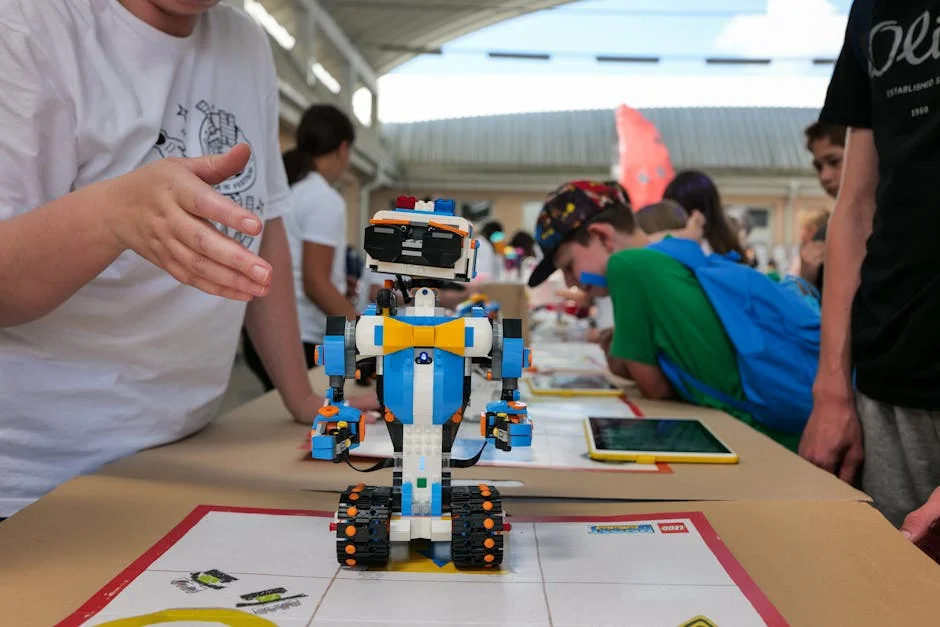
| LEGO BOOST Creative Toolbox | Younger beginners & first-time robotics | Easy setup, guided builds, kid-friendly app, fun introduction to coding concepts | Less expandable and fewer advanced sensors than SPIKE/MINDSTORMS |

Classroom success depends on logistics as much as curriculum. Storage and organization are essential, because missing pins or gears can derail a lesson. Many teachers assign roles within teams—builder, programmer, tester, documenter—to ensure everyone participates. Clear constraints help too: time limits, part limits, or mission rules encourage students to plan rather than endlessly tinker. Assessment can focus on process, not just outcome, rewarding documentation, testing, and iteration. Another benefit is that robotics naturally teaches collaboration and communication. Students must explain why they chose a design, how they debugged a problem, and what changes improved performance. Those skills translate beyond robotics into any technical field. When used thoughtfully, these kits can become a cornerstone of a STEM program, supporting both introductory experiences and more advanced projects over multiple years. If you’re looking for lego robotics kits, this is your best choice.
Competitions and Clubs: Designing for Reliability Under Pressure
Robotics clubs and competitions add excitement and urgency to Lego robotics kits by introducing deadlines, rules, and head-to-head comparisons. The competitive environment encourages builders to think about reliability, not just cleverness. A robot that performs a mission perfectly once but fails the next run is frustrating in a tournament setting. That pushes teams toward robust designs: stronger frames, protected sensors, consistent cable routing, and code that handles unexpected conditions. Teams learn to standardize procedures, such as calibrating sensors at the start of each run and checking battery levels. They also learn the value of simplicity. A complicated attachment might score more points in theory, but a simpler mechanism that works every time often wins.
Clubs also provide a social structure that accelerates learning. Beginners pick up building techniques by watching experienced members reinforce joints or route axles cleanly. Programmers share strategies for smoother turns, better line following, or modular code design. Teams often develop a testing culture: run the same mission repeatedly, record results, identify failure modes, and make targeted changes. This mirrors professional engineering practices like validation and iteration. Competitions can also broaden exposure to project management: dividing tasks, setting milestones, and documenting designs so others can replicate them. Even for participants who do not pursue engineering careers, the experience builds confidence in problem-solving and teamwork. The kit becomes a platform for skills that matter in many domains, from science labs to software teams. If you’re looking for lego robotics kits, this is your best choice.
Expandability and Compatibility: Parts, Add-Ons, and Long-Term Value
One reason Lego robotics kits tend to stay relevant over time is expandability. Builders can add more beams, gears, wheels, and specialty parts to create sturdier frames and more complex mechanisms. Extra motors and sensors open up new possibilities, such as multi-jointed arms, dual-sensor navigation, or coordinated attachments. Many builders also integrate non-robotic Lego elements for aesthetics or themed builds, which keeps projects fresh and personal. Over time, a collection evolves into a toolbox, and the builder starts designing from scratch rather than relying on a single model guide. That transition is important: it marks the shift from following instructions to engineering original solutions.
Compatibility considerations can affect long-term value. Some hubs and sensors work best within their own ecosystem, while certain structural parts remain broadly compatible across Lego building systems. When planning upgrades, it helps to think about what you want to build next. If the goal is vehicles, prioritize wheels, differentials, and sturdy frames. If the goal is arms and grippers, focus on gears, turntables, linear actuators, and strong beams. For classrooms, it can be helpful to standardize on a set of common components so students can share designs and troubleshoot collectively. Long-term value also comes from maintenance: keeping parts sorted, replacing worn tires, and storing sensors safely. A well-maintained kit can support years of projects, and the learning curve continues to rise as builders tackle more ambitious designs. If you’re looking for lego robotics kits, this is your best choice.
Common Mistakes and How to Fix Them Without Frustration
Many frustrations with Lego robotics kits come from a few predictable mistakes, and knowing them in advance can save time. One common issue is building a drivetrain that binds. If axles are forced out of alignment or gears are pressed too tightly, friction increases and performance drops. The fix is usually mechanical: ensure axles are parallel, use proper spacing, avoid bending beams under stress, and test by spinning wheels by hand before adding code. Another frequent problem is relying too much on timed movements. A robot that drives forward for two seconds might travel different distances depending on battery level, floor surface, and wheel wear. Using sensors or encoder-based movement (when available) improves consistency. Even simple improvements—like reducing speed, adding a short braking action, or approaching targets slowly—can make behavior more repeatable.

Sensor placement and calibration also cause trouble. A distance sensor mounted too low might “see” the floor or miss an obstacle; a light sensor mounted too high may read ambient light instead of reflected light from the surface. Builders can fix this by experimenting with mounting height, shielding the sensor from glare, and calibrating thresholds in the actual environment where the robot runs. Code organization matters too. When programs become long, it is easy to lose track of logic and introduce bugs. Breaking code into reusable blocks or functions, naming variables clearly, and testing one behavior at a time helps keep projects manageable. Finally, teams sometimes overbuild: adding too many features too quickly can make troubleshooting difficult. A better approach is to build a minimal working robot, confirm it performs a basic task reliably, then add one upgrade at a time. That method keeps progress steady and reduces the sense of being stuck. If you’re looking for lego robotics kits, this is your best choice.
Buying Tips: What to Look for Before Spending
When shopping for Lego robotics kits, it helps to look beyond the headline features and focus on what you will actually use. Consider the number and type of motors, because motor variety affects what you can build. A kit with multiple motors supports differential drive plus an attachment, while a single-motor kit may limit complexity. Sensor selection matters too. If you want navigation challenges, a distance sensor and a color/light sensor are especially useful. Check whether the hub supports multiple connections and whether the app or software runs smoothly on your devices. Small usability details—like how easy it is to pair Bluetooth, update firmware, and switch between projects—can influence how often the kit gets used.
Also consider the parts inventory and build styles. Kits with more beams, connectors, and gears make it easier to create rigid structures and functional mechanisms. If the goal is creative building, a broader assortment can be more satisfying than a kit that focuses on one flagship model. For families, durability and storage are practical priorities; having a sturdy box or organizer can prevent missing parts and reduce setup time. For education settings, look for platforms with teacher resources, lesson ideas, and a track record of classroom reliability. Finally, think about the learning path. The best purchase is often the one that matches current skill level while leaving room to grow. A kit that is too advanced can feel overwhelming, while one that is too basic may be outgrown quickly. Matching the kit to the builder’s interests—vehicles, animals, machines, competitions—usually matters more than chasing the most expensive option. If you’re looking for lego robotics kits, this is your best choice.
Making the Most of Lego Robotics Kits Over Months and Years
The real payoff of Lego robotics kits comes from sustained use, where each project builds on the last. A good long-term routine is to alternate between guided builds and freeform challenges. Guided models teach new mechanisms and construction techniques, while freeform challenges encourage original thinking and problem-solving. Keeping a simple project journal can help, even for kids: record what was built, what worked, what failed, and what change improved performance. Over time, this habit turns tinkering into a learning process. Builders begin to recognize patterns, like which gear ratios work best for lifting, how sensor height affects readings, or how widening the chassis improves stability. That accumulated knowledge makes future projects faster and more successful.
It also helps to introduce themes and constraints to keep creativity fresh. One month could focus on “robots that draw,” exploring pen mounts, smooth motion, and coordinate-like movement. Another month could focus on “robots that sort,” using sensors and decision logic. Another could be “robots that compete,” emphasizing speed, traction, and reliability. Families can create mini showcases where each person presents a robot and explains one design choice. Clubs can rotate roles so everyone practices building and coding. As skills grow, builders can explore more advanced concepts like proportional control, state machines, and modular attachments. The most important factor is maintaining a sense of playful experimentation. When the robot is allowed to be imperfect and improved over time, learning stays enjoyable. With that mindset, lego robotics kits remain engaging long after the first model is built, because each new idea becomes a reason to rebuild, recode, and try again.
Watch the demonstration video
In this video, you’ll discover what LEGO robotics kits can do and how they help you build, program, and control moving models. You’ll learn about key parts like motors, sensors, and controllers, see how the kits work together, and get tips for choosing the right set for beginners or more advanced projects.
Summary
In summary, “lego robotics kits” is a crucial topic that deserves thoughtful consideration. We hope this article has provided you with a comprehensive understanding to help you make better decisions.
Frequently Asked Questions
What is a LEGO robotics kit?
A LEGO robotics kit combines LEGO building parts with motors, sensors, and a programmable controller so you can build and code moving, responsive robots.
Which LEGO robotics kit is best for beginners?
For most beginners, **LEGO Education SPIKE Essential** (great for younger learners) or **SPIKE Prime** (better suited to older kids and teens) are popular first steps among **lego robotics kits**, offering a smart mix of guided lessons and plenty of room to experiment and create.
Do LEGO robotics kits require a computer or tablet?
In most cases, yes—**lego robotics kits** are typically programmed using an app on a computer or tablet, connecting through USB or Bluetooth. Once the code is transferred, many hubs can store it and run the program on their own without needing to stay connected.
What coding languages do LEGO robotics kits use?
Many **lego robotics kits** use Scratch-style block coding to make building and programming approachable, and depending on the specific kit and software, some platforms also let you step up to text-based languages like Python.
What’s the difference between LEGO Education kits and consumer sets?
Education kits are built for classroom use, offering structured lessons, durable storage, and plenty of teacher-friendly support materials, while consumer sets—including many **lego robotics kits**—are geared toward at-home fun with creative builds and themed models.
What ages are LEGO robotics kits suitable for?
Whether you’re shopping for a young beginner or an adult maker, **lego robotics kits** come in a wide range of skill levels—so be sure to check the recommended age, the build complexity, and factors like small parts and programming difficulty before choosing one.
? Looking for more info about lego robotics kits? Follow Our Site for updates and tips!

Trusted External Sources
- Robots For Kids | Categories | Official LEGO® Shop US
Discover two exciting new featured sets designed for ages 9+: the **Arctic Animals Science Kit** (1,134 pieces) for **$99.99**, and the highly rated **Mars Mission Science Kit** (933 pieces, **5.0** stars). Perfect for curious kids who love hands-on building and exploration, these sets also make a great next step for families looking to expand beyond **lego robotics kits**.
- Best starter robot kits for kids…? LEGO Mindstorms? – Reddit
Mar 13, 2026 … You can build these robot pets with your kids and do block-based programming, Python or C++, and program new voice commands. If you really wanna … If you’re looking for lego robotics kits, this is your best choice.
- LEGO® Education: Hands-on Learning Materials for K-8 Classrooms
By clicking **“Accept All,”** you allow us to use all cookies to personalize and improve your experience, measure site performance, and show you relevant offers—including updates on **lego robotics kits** and other products. Prefer more control? You can manage your cookie settings at any time.
- Teacher looking for good Lego Robo kits for 5 yr olds : r/robotics
May 2, 2026 … I’m a robotics teacher for Kindergartners in the US. I’m looking to purchase a Lego robotics kit that is easy to learn, easy to teach, easy to set up / … If you’re looking for lego robotics kits, this is your best choice.
- Lego Robotics – Amazon.com
Shop quality robot building sets featuring detailed instructions and app-guided experiences. Perfect for curious builders of all levels.