
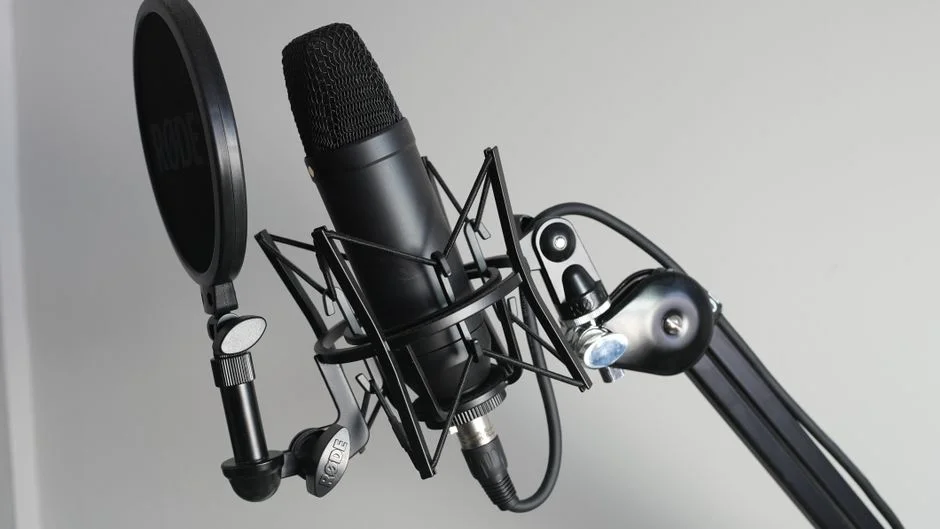
A blue yeti microphone stand is more than a place to park a popular USB mic; it is a mechanical foundation that shapes how consistently you sound and how comfortable you feel while recording. The Blue Yeti is relatively heavy compared with many compact USB microphones, and its weight changes the rules for stability, vibration control, and placement. When the mic is perched on the edge of a desk with its stock base, every keystroke, mouse click, or accidental bump can travel through the surface and end up as low-frequency thumps in the recording. A dedicated stand—especially one built to handle the Yeti’s mass—helps decouple the microphone from desk-borne vibrations and makes it easier to keep the capsule in the same position from one session to the next. Consistency is a hidden superpower for creators: when the mic-to-mouth distance stays stable, your tone, bass proximity effect, and overall loudness stay predictable, which reduces time spent “fixing it in post.” A stand also helps you avoid awkward posture, because you can place the mic where your voice is strongest without craning your neck or leaning forward for long periods. Over hours of streaming, podcasting, or voiceover work, that ergonomic difference can be the line between a sustainable routine and constant discomfort.
Table of Contents
- My Personal Experience
- Why the Blue Yeti Microphone Stand Matters for Sound and Workflow
- Desk Stands, Boom Arms, and Floor Stands: Choosing the Best Format
- Weight Capacity, Stability, and Center of Gravity: The Yeti’s Practical Demands
- Mounting Options: Threads, Adapters, and Compatibility Checks
- Ergonomics and Placement: Getting the Capsule Where Your Voice Works Best
- Vibration Control: Shock Mounts, Isolation, and Desk Noise Management
- Pop Filters, Windscreens, and the Stand’s Role in Plosive Control
- Expert Insight
- Build Quality and Materials: What Separates a Reliable Stand from a Noisy One
- Desk Clamp vs Grommet Mount: Installation, Strength, and Desk Safety
- Space Management for Streamers and Podcasters: Keeping the Desk Usable
- Budget vs Premium: What You Gain as You Spend More
- Maintenance and Longevity: Keeping the Stand Quiet, Smooth, and Secure
- Putting It All Together: A Practical Setup That Sounds Better Every Session
- Watch the demonstration video
- Frequently Asked Questions
- Trusted External Sources
My Personal Experience
I bought a Blue Yeti a while back and quickly realized the stock desktop stand wasn’t going to cut it—every time I bumped the desk or typed, the mic picked it up like a drum. I ended up getting a simple boom-style microphone stand with a shock mount, and it made an immediate difference: the mic sat closer to my mouth, I could lower the gain, and my recordings sounded cleaner without that hollow “roomy” echo. The best part was just getting my desk space back; I didn’t notice how much the Yeti’s base was in the way until it was gone. It took a little trial and error to position it so it didn’t sag over time, but once I tightened the joints and routed the cable along the arm, it’s been a set-it-and-forget-it upgrade. If you’re looking for blue yeti microphone stand, this is your best choice.
Why the Blue Yeti Microphone Stand Matters for Sound and Workflow
A blue yeti microphone stand is more than a place to park a popular USB mic; it is a mechanical foundation that shapes how consistently you sound and how comfortable you feel while recording. The Blue Yeti is relatively heavy compared with many compact USB microphones, and its weight changes the rules for stability, vibration control, and placement. When the mic is perched on the edge of a desk with its stock base, every keystroke, mouse click, or accidental bump can travel through the surface and end up as low-frequency thumps in the recording. A dedicated stand—especially one built to handle the Yeti’s mass—helps decouple the microphone from desk-borne vibrations and makes it easier to keep the capsule in the same position from one session to the next. Consistency is a hidden superpower for creators: when the mic-to-mouth distance stays stable, your tone, bass proximity effect, and overall loudness stay predictable, which reduces time spent “fixing it in post.” A stand also helps you avoid awkward posture, because you can place the mic where your voice is strongest without craning your neck or leaning forward for long periods. Over hours of streaming, podcasting, or voiceover work, that ergonomic difference can be the line between a sustainable routine and constant discomfort.
Beyond stability and comfort, the right blue yeti microphone stand can actively improve the perceived quality of your audio by enabling better mic technique. The Yeti’s pickup patterns, gain control, and side-address design reward careful positioning. A stand that lets you place the mic slightly off-axis—aimed toward the corner of your mouth rather than directly in front—can reduce plosives and harsh breath noise while keeping clarity. Height adjustment matters, too: speaking slightly downward into the grille can tame sibilance and reduce room reflections coming from a hard desktop. A rigid, well-damped stand can also prevent micro-movements that cause fluctuating volume when you gesture or shift in your chair. For many setups, the stand becomes part of the “signal chain,” because it determines whether you can comfortably keep the mic close enough to lower gain and reduce background noise. In other words, a good stand can make the Yeti behave more like a controlled studio microphone, even in an untreated room, because it helps you achieve a close, repeatable placement that minimizes the influence of the environment.
Desk Stands, Boom Arms, and Floor Stands: Choosing the Best Format
The first decision with a blue yeti microphone stand is the format: desk stand, boom arm, or floor stand. Each solves a different problem. Desk stands are compact and quick to set up, making them ideal for minimal desks, travel kits, or shared workspaces. A sturdy desk stand with a heavy base can hold the Yeti securely and keep it from tipping, but it still lives on the same surface as your keyboard and mouse. That means you may need additional vibration control, such as a shock mount or isolation pad, if your desk is lively. A desk stand typically gives you a short vertical range, which can force the mic to sit lower than ideal unless you stack it on a riser. Many people end up speaking “over” the microphone rather than into it, which can make the tone thin and can also pick up more room sound. Desk stands can be excellent when paired with a pop filter and careful gain staging, but they demand more attention to placement and desk noise.
Boom arms are the most popular pairing for the Yeti because they move the microphone off the desktop and into a floating, adjustable position. A boom-style blue yeti microphone stand attaches to the desk via clamp or grommet mount, allowing you to swing the mic in close when recording and push it away when not needed. This improves workflow for gaming, streaming, and hybrid work, because you can reclaim desk space instantly. A quality arm also makes it easier to position the mic at mouth level and keep it there, which improves consistency and reduces fatigue. Floor stands are less common for USB setups but can be the best choice when the desk can’t accept a clamp, when you need to stand while presenting, or when you want to place the mic away from the computer to reduce fan noise. Floor stands also help in multi-person rooms, but you must manage cable runs and trip hazards. The right format depends on whether you prioritize portability, desk space, reach, and the ability to reposition quickly between tasks.
Weight Capacity, Stability, and Center of Gravity: The Yeti’s Practical Demands
Because the Blue Yeti has a substantial body and can feel top-heavy depending on how it’s mounted, the blue yeti microphone stand you choose must have a realistic load rating and a stable design. Load rating is not just a marketing number; it relates to how much an arm sags over time, how well the joints hold position, and whether the stand creeps downward during long sessions. A sagging arm is more than an annoyance: it changes your mic distance mid-recording and can lead to inconsistent loudness and tone. Look for metal construction, robust springs or internal tension systems, and joints that lock securely without needing to overtighten. If a stand requires extreme torque to keep the mic from drooping, that’s a sign the mechanism is underbuilt for the Yeti. Stability also involves the desk clamp: a narrow clamp can twist, while a wide clamp with protective pads grips more evenly and reduces vibration transfer. If you use a grommet mount, ensure the desk thickness and hole size match the hardware so the arm doesn’t wobble.
Center of gravity is especially important when the microphone is extended outward on a boom. The farther you extend, the more leverage the mic exerts on the arm and clamp. A blue yeti microphone stand with a longer reach can be convenient, but only if the arm’s design accounts for that leverage with strong springs and rigid segments. If the mic is mounted in a shock mount, the effective weight increases slightly, and the center of mass may shift forward, demanding even more from the arm. With desk stands, the base’s diameter and weight determine tip resistance. A wide, heavy base is safer than a narrow one, particularly if you have pets, kids, or an active streaming style with lots of hand movement. Even cable routing affects stability: a stiff USB cable can tug the microphone and create constant low-level tension that pulls the stand off position. Choosing a stand that supports the Yeti’s weight comfortably, rather than barely, keeps your setup reliable and prevents the slow drift that ruins otherwise great takes.
Mounting Options: Threads, Adapters, and Compatibility Checks
Compatibility is a common stumbling block when shopping for a blue yeti microphone stand because the Yeti can be used with its stock yoke, with third-party shock mounts, or with different adapters depending on the stand’s thread size. Many microphone accessories use either 5/8-inch or 3/8-inch threading, and some stands include both via a screw-in adapter. Before buying, confirm what thread your chosen mount expects and what your stand provides. If you plan to keep the Yeti in its original yoke, you’ll typically connect via a standard mic stand thread adapter; if you plan to use a shock mount, the shock mount itself may have a different thread requirement. A mismatch is easy to fix with a cheap adapter, but it can add unwanted height, looseness, or wobble if the parts are low quality. Solid metal adapters with clean threading help ensure the mic doesn’t rotate unexpectedly during use.
Another compatibility detail is clearance. The Blue Yeti’s body is wide, and some compact stands or narrow shock mounts can interfere with the gain knob, pattern selector, or headphone jack depending on the orientation. A blue yeti microphone stand that positions the mic too close to the vertical pole may block your hand from reaching the controls, which is frustrating when you need to make quick adjustments during a stream. If you intend to monitor through the Yeti’s headphone output, you’ll also want enough room for the headphone cable to exit cleanly without bending sharply against the stand. Cable strain can cause intermittent connection issues over time. When using a boom arm, consider whether the arm’s head allows easy rotation and whether it supports a standard ball joint or swivel. Smooth, controlled rotation is valuable when switching between speaking positions, such as turning slightly toward a second monitor or a co-host. Paying attention to these details upfront prevents the “almost fits” scenario that leads to awkward positioning and compromised audio.
Ergonomics and Placement: Getting the Capsule Where Your Voice Works Best
Ergonomics is where a blue yeti microphone stand pays for itself. The best audio usually comes when the mic is close enough to capture more voice and less room, but “close enough” must also be comfortable. If your stand forces the microphone to hover in front of your face, it can block your view of screens and encourage you to lean away, defeating the purpose. A good stand lets you place the Yeti slightly to the side, at about mouth height, angled toward you. This keeps the microphone in the sweet spot while preserving sightlines. Many creators find that positioning the mic 6 to 10 inches away, slightly off-axis, balances clarity with plosive control, especially when combined with a pop filter. The stand’s adjustability is key: if you can’t fine-tune height and angle easily, you’ll settle for a “good enough” position that may increase mouth noise, sibilance, or room reflections.
Desk height, chair posture, and monitor placement all interact with your stand choice. A blue yeti microphone stand on a boom arm can be set so the mic floats just above the desk line, allowing you to sit upright with shoulders relaxed while speaking naturally. If you record for long sessions, the ability to keep your head neutral—rather than jutting forward—reduces vocal strain. For standing desks, an arm with generous vertical range can keep the mic aligned when you switch between sitting and standing. Floor stands can also work well here, but they require more careful placement to avoid bumps and to keep cable routing tidy. Consider how often you move: if you frequently turn to a second monitor, a stand that allows easy repositioning helps maintain consistent mic distance. The goal is a setup where the microphone meets you, not one where you contort yourself to meet the microphone. When your posture is stable and relaxed, your voice often sounds better, too—more controlled breathing, less tension, and fewer unintended level spikes.
Vibration Control: Shock Mounts, Isolation, and Desk Noise Management
One of the biggest reasons to upgrade from the stock base is vibration control, and a blue yeti microphone stand can be the first line of defense. Mechanical noise travels easily through rigid surfaces, especially desks. Even if you don’t hear it while monitoring casually, recordings can reveal subtle thumps or rumbles when you type, tap a foot, or rest your forearm on the desk. A boom arm reduces direct contact with the desktop, but it can still transmit vibration through the clamp if the desk itself is resonant. That’s where shock mounts and isolation techniques help. A shock mount suspends the microphone in elastic bands or a flexible cradle, reducing the transfer of low-frequency vibration. Not all shock mounts fit the Yeti’s body shape, so you’ll want one specifically designed for it or one with adjustable rings that can accommodate its diameter. If you keep the mic on a desk stand, placing the stand on an isolation pad can reduce vibration, though it won’t eliminate it as effectively as a suspended mount.
Good vibration control also involves cable management. A stiff USB cable can act like a vibration bridge between the microphone and the computer, especially if it’s pulled taut. With a blue yeti microphone stand on an arm, route the cable along the arm using soft ties or Velcro straps, leaving a gentle service loop near the mic to prevent tugging. If your arm has internal cable channels, ensure the cable isn’t pinched, which can create intermittent disconnects. Keyboard noise and mouse clicks are partly acoustic and partly mechanical transmission. The stand helps with the mechanical part, but you can improve results by placing the keyboard on a desk mat, using softer key switches, and keeping the mic aimed away from noise sources. Because the Yeti is sensitive, lowering the gain and bringing the mic closer can reduce room pickup, but only if the stand allows comfortable close placement. When the stand, mount, and cable routing work together, you’ll notice not just fewer thumps, but also a more “studio-like” steadiness in the background, which makes voices sound more professional without heavy noise reduction artifacts.
Pop Filters, Windscreens, and the Stand’s Role in Plosive Control
Plosives—those bursts of air on “P” and “B” sounds—can overload the capsule and create distracting low-frequency blasts. A blue yeti microphone stand influences plosive control because it determines whether you can position the mic properly and mount a pop filter securely. Many pop filters attach via a clamp and gooseneck, which needs space on the desk or on the stand’s pole. If your stand is too short or too crowded, the pop filter may end up at an awkward angle, leaving gaps where air hits the mic directly. With a boom arm, you can mount the pop filter so it sits a couple inches in front of the grille, then place the mic slightly off-axis to further reduce blasts. Foam windscreens are another option, and they are compact, but they can slightly reduce high-frequency detail. Some creators prefer a pop filter for clarity and a windscreen for convenience; the best choice depends on your voice and room.
Expert Insight
Choose a stand that matches your recording style: a desk boom arm saves space and lets you position the Blue Yeti 6–10 inches from your mouth, while a weighted desktop stand is best if you prefer a simple, stable setup. Confirm the mount is compatible (the Blue Yeti uses a standard 5/8-inch thread, often with an included adapter) so you can attach it securely without wobble. If you’re looking for blue yeti microphone stand, this is your best choice.
Improve sound and reduce noise by isolating the mic from desk vibrations—use a shock mount if your stand supports it, or add a small foam pad under the base. Route the USB cable along the arm with Velcro ties and leave a little slack near the mic to prevent cable tugging and accidental bumps during recording. If you’re looking for blue yeti microphone stand, this is your best choice.
The stand also affects how easily you can maintain a consistent mouth-to-filter distance. If you drift closer during an excited moment, plosives return. A blue yeti microphone stand with smooth, reliable joints lets you place the mic and filter so you naturally speak at the right distance without thinking about it. For streamers who move a lot, a stable arm is crucial: if the mic bounces or slowly sags, the pop filter position changes, and you may suddenly hear more breath noise. Another factor is the Yeti’s side-address design. Speaking into the top like a stage mic makes plosive control harder and often sounds thin. A stand that encourages correct side-address placement—capsule facing you—makes pop filters and wind protection more effective. If you share your space with fans or air conditioning drafts, the ability to angle the mic away from airflow can reduce rumble and flutter. Ultimately, plosive control is a chain: technique, filter choice, and stand positioning. When the stand makes proper placement effortless, your recordings become cleaner and require less EQ and compression to sound polished.
Build Quality and Materials: What Separates a Reliable Stand from a Noisy One
Build quality matters because a blue yeti microphone stand is a mechanical device that will be adjusted repeatedly, sometimes multiple times per day. Cheap stands can develop squeaks, loose joints, and slipping clamps that become a constant distraction. Metal construction—steel or aluminum—generally outlasts plastic components, especially at stress points like hinges and clamp screws. Springs should feel smooth and controlled rather than jerky, and the arm segments should remain rigid when extended. If you hear creaking when you reposition the mic, that sound can sometimes be picked up during live streams or recordings if you adjust on-air. Even when it’s not recorded, it interrupts your flow. A well-built stand also protects your equipment: a sudden drop can damage the microphone, the USB port, or your desk surface if the mic slams down.
| Option | Best for | Key benefits | Potential drawbacks |
|---|---|---|---|
| Desktop stand (stock Yeti base) | Simple desk setups and occasional use | Stable, no extra hardware needed, quick to set up | Takes desk space, can transmit desk vibrations, limited positioning |
| Boom arm (desk-mounted) | Streaming, podcasting, and frequent mic adjustments | Frees desk space, flexible positioning, easier to keep consistent mic distance | Requires a sturdy desk edge; may need a Yeti-compatible adapter; can pick up arm movement if not isolated |
| Floor stand (tripod) | Recording away from the desk or multi-use rooms | Independent placement, adjustable height, good for standing/sitting setups | More floor clutter, easier to bump, less convenient for constant repositioning |
Finish and hardware details also influence long-term satisfaction. A blue yeti microphone stand with rubberized clamp pads can prevent desk scratches and improve grip. Knobs should be easy to tighten by hand without needing tools, but they should also resist loosening over time. Some arms use internal springs for a cleaner look and reduced snagging, while others use external springs that are easy to service. Either can be fine if the tension system is strong enough for the Yeti’s weight. Pay attention to the stand’s range of motion: can it rotate 360 degrees at the base, and does it have enough vertical travel to clear monitors? If you have a multi-monitor setup, you’ll appreciate an arm that can reach around screens without forcing the mic into a bad angle. Finally, consider noise isolation in the joints. Some higher-quality stands include washers or bushings that reduce metal-on-metal contact, making adjustments smoother and quieter. Over months of use, those small engineering details are the difference between a stand that feels like a permanent part of your studio and one that feels like a temporary workaround.
Desk Clamp vs Grommet Mount: Installation, Strength, and Desk Safety
How you attach a blue yeti microphone stand to your desk affects stability and the health of your furniture. Desk clamps are popular because they require no drilling and can be installed in minutes. A good clamp spreads pressure across a wide area and uses protective pads to avoid dents and scratches. If your desk is particleboard or has a thin veneer, clamp pressure matters; overtightening can damage the surface or cause the clamp to sink in over time. For that reason, many creators add a small reinforcement plate—wood or metal—under the clamp area to distribute force. Clamps also require a clean edge with enough clearance underneath for the screw mechanism. If your desk has a thick lip, drawers, cable trays, or a beveled edge, fitting the clamp can be tricky. Measuring the desk thickness and checking the clamp’s maximum opening helps avoid surprises.
Grommet mounting is a more permanent option and can provide excellent stability, especially for heavier microphones like the Yeti. A blue yeti microphone stand installed through a grommet hole anchors directly to the desk and often reduces wobble compared with edge clamps. Many desks already have cable grommet holes you can repurpose, but you must confirm the hole diameter and whether the grommet mount hardware fits. If you drill a new hole, careful placement is essential to avoid weakening the desk or interfering with supports underneath. Grommet mounting also changes how you manage cables, often allowing a cleaner route down through the desk. The trade-off is flexibility: moving the stand later is harder. For shared spaces or renters, a clamp is usually more practical. For dedicated studios, a grommet can feel more professional and secure. Either way, the goal is a mount that doesn’t shift during use, because even minor movement can change the mic angle and distance, which your audience hears as inconsistent tone and level.
Space Management for Streamers and Podcasters: Keeping the Desk Usable
A blue yeti microphone stand can transform a crowded desk into a functional production space. Streamers often juggle a keyboard, mouse, audio interface or mixer, camera, lighting controls, and multiple monitors. When the mic sits on the desk, it competes with everything else and forces compromises. A boom arm reclaims that space by lifting the mic off the surface and letting you park it to the side when not speaking. This is especially valuable for gamers who need full mouse range or for creators who use large desk mats. With the mic floating, you can also position it so it doesn’t block the camera frame, which helps maintain a clean on-screen look. If your setup includes notes, a tablet, or a stream deck, the ability to swing the mic out of the way makes the workspace feel less cramped and reduces the chance of bumping the mic during a live session.
Podcasters benefit in slightly different ways. A blue yeti microphone stand that supports precise placement helps keep the mic at a consistent distance, which makes editing easier and reduces the need for aggressive compression. If you record with co-hosts in the same room, stands become part of the choreography: you need to keep microphones positioned so they capture each speaker clearly while minimizing bleed. While the Blue Yeti is often used as a single-person mic, some creators still use it in small group settings, and stand placement becomes crucial for controlling room sound and preventing accidental contact. Cable routing also affects desk usability. When the cable is neatly tied along the arm and guided to the computer, you reduce clutter and avoid snags that can pull the mic out of position. Even small organizational improvements—like placing the clamp behind a monitor or at the corner of the desk—can make the stand feel invisible while still doing its job. A stand that integrates cleanly with your desk layout supports a calmer workflow, and that calm tends to show up in your performance and delivery.
Budget vs Premium: What You Gain as You Spend More
The price range for a blue yeti microphone stand is wide, and the differences are not only cosmetic. Budget stands can work, particularly for light use or for creators who rarely reposition the microphone. If you choose a lower-cost option, prioritize load rating, clamp quality, and whether the arm holds position without constant tightening. Some budget arms look similar to premium models but use weaker springs and softer metal, which may sag under the Yeti’s weight or develop play in the joints. That play can lead to small shifts as you speak or touch the desk, which is frustrating during recording. Budget desk stands can also be fine if they have a heavy base and enough height to bring the mic closer to mouth level, but many are designed for lighter handheld dynamics and may feel unstable with a heavy USB mic.
Premium stands tend to offer smoother motion, better damping, and more reliable long-term performance. A higher-end blue yeti microphone stand often uses internal springs, precision joints, and stronger clamps that hold firmly without damaging the desk. The experience is different: you can move the mic with one hand, it stays where you put it, and it doesn’t creak or bounce. Premium arms also tend to manage cables better, either with channels or integrated clips, which keeps your setup cleaner. Another advantage is repeatability. When the arm’s friction and tension are consistent, you can return the mic to the same spot every time, which helps maintain a consistent sound signature across episodes. That said, premium isn’t always necessary. If you record occasionally, a midrange stand that meets the Yeti’s weight requirements and offers adequate adjustability can deliver most of the benefits. The key is to avoid false economy: replacing a sagging arm after a few months can cost more than buying a solid stand once. Matching the stand to your frequency of use and your tolerance for tinkering helps you spend wisely.
Maintenance and Longevity: Keeping the Stand Quiet, Smooth, and Secure
Once you’ve chosen a blue yeti microphone stand, basic maintenance keeps it performing like new. Start with periodic checks of the clamp and joints. Screws can loosen over time due to vibration and repeated movement, especially if you frequently reposition the mic. Tighten hardware gently but firmly, avoiding overtightening that can strip threads or crush desk surfaces. If your arm uses external springs, inspect them occasionally for signs of wear or deformation. For internal spring arms, pay attention to tension adjustment mechanisms and follow the manufacturer’s guidance for balancing the load. A properly balanced arm should hold the Yeti at your chosen height without drifting up or down. If you notice sagging, adjust tension rather than compensating by tightening every joint to the point where movement becomes stiff and noisy.
Cleanliness also matters. Dust can accumulate in joints and on clamp pads, reducing grip and causing squeaks. Wipe down the stand with a soft cloth and keep rubber pads free of debris. Cable management should be revisited when you change your desk layout or add devices. A blue yeti microphone stand with a cable that’s too tight will slowly pull out of alignment, and repeated tugging can stress the USB connector. Leave a little slack near the mic and at the computer end, and secure the cable along the arm so it doesn’t swing and tap against metal segments. If you hear squeaking during movement, a small amount of appropriate lubricant on specific joint points may help, but only if recommended by the manufacturer; some materials and finishes can be damaged by the wrong product. Finally, treat the stand like part of your recording instrument. Avoid using it as a handle to move the desk or as a hook for heavy headphones, since extra loads can affect alignment and wear. With light care, a good stand can last for years and remain a dependable part of your daily workflow.
Putting It All Together: A Practical Setup That Sounds Better Every Session
A satisfying setup comes from aligning your recording habits with the mechanics of your gear. The Blue Yeti can deliver clean, present voice audio when it’s placed close, aimed correctly, and isolated from vibration, and the stand is what makes that placement practical day after day. Start by deciding where you naturally sit or stand, then position your blue yeti microphone stand so the mic can reach your mouth without blocking screens or forcing you to hunch. Set the mic slightly off-axis, add a pop filter if plosives are an issue, and lower the gain as you bring the mic closer. When the stand holds the microphone steady, you can focus on performance rather than constantly nudging the mic back into place. If your desk is noisy, consider adding a shock mount or an isolation strategy, and route the cable so it doesn’t pull. These small steps compound into a noticeable improvement in clarity and consistency, even before you touch EQ or compression.
Over time, the right stand also makes your workflow faster. You’ll develop a repeatable “home position” for the mic, and your recordings will match across days and projects because the geometry stays the same. That consistency reduces editing time and makes your voice sound more professional to listeners, clients, or teammates. Whether you choose a heavy desk base for simplicity, a clamp-on boom for flexibility, or a floor stand for unique room layouts, the goal is the same: stable, comfortable, and controllable placement. If you treat placement and ergonomics as part of your sound, you’ll get more out of the Yeti without chasing endless settings. The final takeaway is simple: a blue yeti microphone stand is not just an accessory, it’s the piece that turns a capable microphone into a dependable recording tool you can trust every time you hit record.
Watch the demonstration video
In this video, you’ll learn how to choose and set up a stand for the Blue Yeti microphone to improve stability and sound quality. It covers popular stand options (desk stand, boom arm, and floor stand), how to mount the mic securely, and tips for positioning to reduce vibrations, noise, and clutter in your recording space. If you’re looking for blue yeti microphone stand, this is your best choice.
Summary
In summary, “blue yeti microphone stand” is a crucial topic that deserves thoughtful consideration. We hope this article has provided you with a comprehensive understanding to help you make better decisions.
Frequently Asked Questions
What type of stand works best with a Blue Yeti microphone?
Depending on your setup and how you like to position your mic, a **blue yeti microphone stand** can be as simple as a sturdy desktop base or as flexible as a desk-mounted boom arm—just make sure it supports a 5/8″-27 mic thread (or includes a 3/8″ adapter) for a secure fit.
Does the Blue Yeti fit standard microphone stands?
Absolutely. The Blue Yeti features a standard 5/8″-27 thread, so it will fit most **blue yeti microphone stand** options right out of the box. If your stand uses a 3/8″ thread instead, you can still use it easily with a simple thread adapter.
Do I need an adapter to mount a Blue Yeti on a boom arm?
Often, yes. Many boom arms use a 5/8″-27 thread and will screw in directly, but if yours is a 3/8″ mount, you’ll need a simple 3/8″ to 5/8″ thread adapter to use it with a **blue yeti microphone stand**.
How do I reduce vibration and desk noise when using a stand?
If your mic supports it, mount it on a boom arm with a compatible shock mount to cut down on vibrations. If you’re using a **blue yeti microphone stand**, place a foam or isolation pad underneath it to reduce desk noise, and whenever possible, keep the mic off the desktop surface for cleaner audio.
What boom arm weight capacity is recommended for a Blue Yeti?
Pick a sturdy boom arm rated for at least 2.5 lb (1.1 kg) so it can confidently hold your Blue Yeti—plus any accessories—without drooping or wobbling, making it a reliable **blue yeti microphone stand** option.
Can I use the Blue Yeti’s original base with a pop filter and still get good positioning?
Yes, it’ll work—but your positioning options are pretty limited. A boom arm usually gives you much better placement, letting you keep the mic about 6–10 inches from your mouth while also clearing up desk space compared to a **blue yeti microphone stand**.
? Looking for more info about blue yeti microphone stand? Follow Our Site for updates and tips!

Trusted External Sources
- Microphone Stand for Blue Yeti, Quadcast Boom Arm Scissor Mic …
Designed to work seamlessly with the Blue Yeti, Snowball, and most standard-size microphones, this **blue yeti microphone stand** includes an industry-standard 3/8″ to 5/8″ screw adapter for quick, secure setup and reliable support.
- Blue Yeti owners, can you lead me to the mic arm you are using?
Nov 11, 2026 … You can screw the yeti onto it right at the end by taking off the mic holder. I have my arm attached to a mic stand so I have more options on … If you’re looking for blue yeti microphone stand, this is your best choice.
- Amazon.com: Youshares Blue Yeti Mic Stand with Pop Filter
Stability is a top priority with this heavy-duty microphone boom arm, built to securely support mics weighing up to 1.4 kg (3 lbs). Its reinforced design and strong springs keep your setup steady and reduce unwanted movement—making it a reliable choice for a **blue yeti microphone stand** or other popular studio microphones.
- Need help finding a good desktop mic stand for this : r/blueyeti – Reddit
Apr 1, 2026 … You can get a standard mic stand on Amazon for about $12. The base of the Blue Yeti takes the standard 5/8-27 thread. You can also make a stand … If you’re looking for blue yeti microphone stand, this is your best choice.
- Amazon.com: Blue Yeti Microphone Boom Arm – Upgraded Heavy …
Upgrade your recording setup with a heavy-duty boom arm designed for the Blue Yeti, featuring hidden cable management to keep your desk clean and a sturdy clamp that stays firmly in place. This **blue yeti microphone stand** compatible boom arm offers smooth positioning and reliable stability—ideal for streaming, podcasting, or voiceovers.

