An Elegoo 3D printer has become a familiar option for makers who want dependable printing without paying boutique prices, and the brand’s range makes it easier to match a machine to your real-world projects. Elegoo’s lineup typically spans resin (MSLA/LCD) models designed for high-detail miniatures and jewelry-style parts, plus FDM machines that lean toward functional prototypes, household fixtures, and larger prints where strength and size matter more than microscopic surface texture. That split is important because it shapes everything else: the materials you’ll buy, the safety setup you need, the slicing software settings that matter most, and the kind of maintenance that keeps prints consistent. If your priority is crisp detail—like tabletop figures, small mechanical components, or display models—resin machines tend to deliver the “wow” factor. If you want brackets, enclosures, jigs, organizers, or parts that need to take a bit of heat and stress, filament printers are often the practical choice. Knowing where your projects sit on that spectrum is the first step to getting the most from the Elegoo platform.
Table of Contents
- My Personal Experience
- Understanding the Elegoo 3D Printer Ecosystem
- Choosing Between Elegoo Resin and Filament Models
- Setting Up Your Workspace for Reliable Printing
- Slicer Software and Profiles: Getting the Basics Right
- Resin Printing Workflow: From Vat to Finished Part
- FDM Printing Workflow: First Layer, Adhesion, and Strength
- Materials and Consumables: Resin Types, Filaments, and Storage
- Expert Insight
- Maintenance and Longevity: Keeping Print Quality Consistent
- Troubleshooting Common Problems Without Guesswork
- Print Quality Upgrades: When Accessories Actually Help
- Cost of Ownership: What to Budget Beyond the Printer
- Project Ideas and Practical Use Cases
- Final Thoughts on Getting the Best Results
- Watch the demonstration video
- Frequently Asked Questions
- Trusted External Sources
My Personal Experience
I picked up an Elegoo 3D printer after getting tired of outsourcing small parts, and it’s been a mix of “wow” and “why is it doing that?” The first weekend I printed a simple calibration cube and a phone stand, and the detail surprised me once I slowed the first layer down and leveled the bed properly. I did have a few early failures—mostly adhesion issues and one print that turned into a stringy mess because I underestimated how much drafty air in my room mattered. After a couple of tweaks (cleaning the build plate, dialing in temperatures, and running a quick test print before big jobs), it became pretty reliable. Now I mostly use it for brackets, organizers, and little replacement clips around the house, and it’s satisfying to go from a quick sketch to a functional part in a few hours.
Understanding the Elegoo 3D Printer Ecosystem
An Elegoo 3D printer has become a familiar option for makers who want dependable printing without paying boutique prices, and the brand’s range makes it easier to match a machine to your real-world projects. Elegoo’s lineup typically spans resin (MSLA/LCD) models designed for high-detail miniatures and jewelry-style parts, plus FDM machines that lean toward functional prototypes, household fixtures, and larger prints where strength and size matter more than microscopic surface texture. That split is important because it shapes everything else: the materials you’ll buy, the safety setup you need, the slicing software settings that matter most, and the kind of maintenance that keeps prints consistent. If your priority is crisp detail—like tabletop figures, small mechanical components, or display models—resin machines tend to deliver the “wow” factor. If you want brackets, enclosures, jigs, organizers, or parts that need to take a bit of heat and stress, filament printers are often the practical choice. Knowing where your projects sit on that spectrum is the first step to getting the most from the Elegoo platform.
Beyond the printer itself, the ecosystem includes slicers, replacement consumables, and workflow habits that turn “it prints sometimes” into repeatable success. For resin, that means a stable station for washing and curing, a consistent way to filter and store resin, and a plan to manage odors and spills. For filament, it means leveling routines, a clean build surface, dry filament storage, and a willingness to tune temperatures and retraction for your material. An Elegoo 3D printer can be straightforward, but “straightforward” still benefits from a process: you want predictable room temperature, a clean workspace, and a routine for checking wear items like FEP film (resin) or nozzles and PTFE tubing (FDM). When you treat the machine as part of a system—printer, software, materials, post-processing, and safety—you’ll find that print quality improves faster than if you chase random settings one at a time.
Choosing Between Elegoo Resin and Filament Models
Picking the right Elegoo 3D printer starts with being honest about what you expect from the final part, because resin and filament solve different problems. Resin printers excel at capturing fine edges, embossed text, and smooth curves, making them ideal for figurines, dental-style models, small gears, and parts where appearance is the priority. The tradeoff is that resin workflows involve liquid chemicals, gloves, ventilation, and post-processing steps like washing and curing. Filament printers, by contrast, are generally simpler in daily handling—spools are less messy than vats of resin—and they produce parts that can be tougher in many practical use cases. For example, a PLA prototype can be printed quickly and cheaply to check fit, while PETG or ABS-like filaments can handle more heat and impact depending on the specific blend. When you compare them, it’s less about which is “better” and more about which matches your habits and environment. If you can dedicate a space and don’t mind careful cleanup, resin is a powerful route. If you want a machine in a multipurpose room and prefer lower mess, FDM may fit better.
Print volume and throughput also influence the decision. Resin printers often have smaller build areas than similarly priced filament machines, and while they can print multiple parts at once, the time is largely determined by height rather than how many items you pack on the plate. That’s great for batches of small miniatures but less convenient for tall, bulky objects. Filament printers scale more naturally to larger objects, and you can pause, swap filament colors, or embed hardware mid-print. Another consideration is tolerance and mechanical behavior: resin can be brittle depending on formulation, while filament materials can flex and absorb impact better. That said, modern resins include tough, ABS-like, and flexible options, and modern filaments include carbon-fiber blends and engineering plastics. If you’re planning a mix—miniatures plus functional brackets—some users eventually run both types. Starting with one Elegoo 3D printer that aligns with your most frequent project type usually delivers better satisfaction than choosing based on occasional “maybe someday” prints.
Setting Up Your Workspace for Reliable Printing
A good workspace matters as much as the Elegoo 3D printer you buy, because many print failures come from unstable conditions rather than “bad settings.” For resin printing, focus on ventilation, spill control, and consistent temperature. Resin behaves differently when it’s cold; viscosity increases and exposure needs can shift, leading to weak adhesion or incomplete curing. A stable room temperature and a printer enclosure or warm area can dramatically improve reliability. You also want a washable surface or a silicone mat under the printer, plus paper towels, dedicated tools, and a sealed container for waste. For filament printing, the workspace priorities change: you want a sturdy table that doesn’t wobble, clearance for the gantry to move, and a plan to keep filament dry. Humidity can cause popping, stringing, and weak layers, especially with hygroscopic materials like nylon or some PETG. Even PLA benefits from dry storage when you want consistent surface finish. A simple dry box or sealed bin with desiccant can prevent many headaches.
Lighting and organization are underrated. With resin, you’ll be handling small supports, cleaning print plates, and inspecting parts for uncured residue; good lighting reduces mistakes and improves safety. With filament, you’ll often be watching the first layer closely; a well-lit build area makes it easier to spot poor adhesion, nozzle drag, or uneven extrusion. Keep a small “maintenance kit” near the machine: isopropyl alcohol (for resin cleanup), nitrile gloves, a plastic scraper, spare FEP film if you run resin, spare nozzles if you run filament, and a soft brush for dust. Dust on rails and lead screws can create subtle artifacts over time. If your Elegoo 3D printer is in a shared space, consider an enclosure for both noise and temperature stability. The goal is to reduce variability—when the environment is consistent, your slicer settings become predictable, and troubleshooting becomes much easier because fewer variables are changing between prints.
Slicer Software and Profiles: Getting the Basics Right
Slicing is where your digital model becomes a set of instructions your Elegoo 3D printer can execute, and a solid starting profile saves hours of trial and error. Resin slicers focus heavily on exposure time, lift distance, lift speed, and support strategy. Exposure controls how fully each layer cures; too little exposure causes weak layers and failures, while too much exposure can blur details and make supports harder to remove. Lift settings influence suction forces on the FEP, which can cause partial detachment if too aggressive. Support settings matter because resin prints are often oriented at an angle to reduce cross-sectional area and improve surface quality; supports must be strong enough to hold the part but placed intelligently to avoid scarring critical details. Filament slicers focus on layer height, wall count, infill, temperatures, retraction, and cooling. A profile that matches your nozzle size and material is essential, and it’s wise to start with manufacturer-like defaults before chasing perfection.
Calibration prints can be useful, but only if you interpret them correctly and change one variable at a time. For resin, exposure tests help you find the “sweet spot” where text is crisp and supports are neither too fragile nor fused. For filament, first-layer calibration is often the biggest quality lever: correct Z offset, proper bed leveling, and a clean build surface solve many issues that people mistakenly attribute to temperature. If you swap materials frequently, save separate slicer profiles for each: PLA, PETG, ABS, and TPU each have different needs, just as standard resin differs from tough resin. Also remember that model quality matters: non-manifold geometry, thin walls, and poorly exported STLs can slice unpredictably. A reliable Elegoo 3D printer paired with a sloppy model can still produce disappointing results. Treat slicing as part of craftsmanship—profiles, notes, and small controlled adjustments lead to a stable workflow that feels professional rather than experimental.
Resin Printing Workflow: From Vat to Finished Part
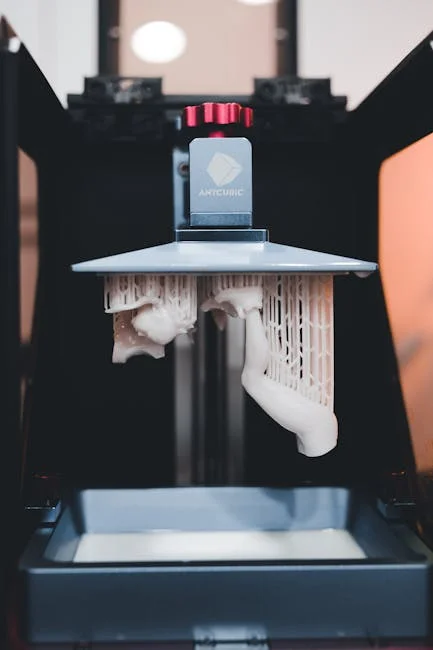
When using an Elegoo 3D printer that relies on resin, the workflow is a sequence of controlled steps that protect both quality and safety. Start by checking the vat: ensure the FEP film is clean, tight, and free of cloudy patches or deep scratches. Even small cured fragments left in the vat can puncture the film during the next print, so it’s smart to filter resin after failures and inspect the bottom carefully. Leveling the build plate properly is crucial; a plate that’s slightly off can cause uneven adhesion, leading to warped bases or partial detachment. Once the print starts, resist the urge to constantly open the cover, because ambient light and temperature fluctuations can affect resin behavior. After printing, allow excess resin to drip back into the vat for a minute or two, then remove the build plate and proceed to washing.
Washing and curing are where many prints are won or lost. A thorough wash removes uncured resin from crevices; if residue remains, it can cure later and leave glossy blotches or sticky surfaces. Two-stage washing—first a “dirty” bath to remove most resin, then a clean rinse—often produces better results and extends the life of your solvent. After washing, let the part dry completely before curing, because trapped alcohol can create white marks or surface haze. Curing should be strong enough to fully harden the part but not so aggressive that it becomes brittle. Support removal is easiest when the part is only partially cured; many users wash, do a short cure, remove supports, then do a final cure to finish. Throughout the process, keep gloves on and avoid skin contact with liquid resin. With the right routine, an Elegoo 3D printer can produce parts that look injection-molded, but consistency comes from disciplined handling as much as from exposure settings.
FDM Printing Workflow: First Layer, Adhesion, and Strength
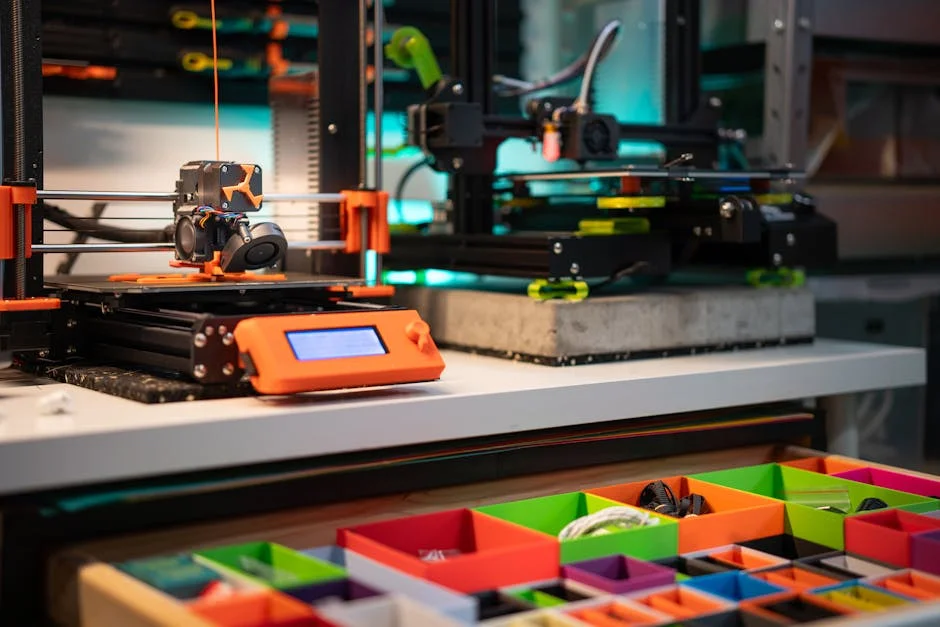
For filament-based machines, the most important moment in an Elegoo 3D printer job is the first layer. A perfect first layer is slightly squished, continuous, and evenly bonded to the bed across the entire surface. If the nozzle is too high, lines won’t fuse and corners may lift; too low, and you’ll see ridges, poor extrusion, and potential nozzle clogs. Bed leveling—manual or assisted—should be treated as a routine, especially after moving the printer or changing the nozzle. Cleanliness matters: oils from fingerprints reduce adhesion, so wiping the build surface with the appropriate cleaner and avoiding touching the print area can prevent mysterious failures. For PLA, adhesion is usually straightforward; for PETG, you may need a release-friendly surface to avoid damaging the bed; for ABS-like materials, an enclosure and controlled cooling can reduce warping. The goal is to create a stable foundation so the rest of the print can proceed without drama.
Strength is not just “more infill.” Layer adhesion, wall thickness, print orientation, and temperature choices often matter more than cranking infill to 80%. If you need a bracket to hold weight, increasing perimeters and printing so that layers align with the direction of stress can improve durability significantly. Temperature tuning helps layers fuse; too cool and parts delaminate, too hot and you get stringing and soft corners. Cooling also matters: strong cooling improves bridging and surface finish for PLA, but excessive cooling can reduce layer adhesion for some materials. Retraction settings reduce stringing, but too much retraction can cause under-extrusion and weak spots. When you dial in these fundamentals, an Elegoo 3D printer can produce functional parts that handle daily use, and your prints will look cleaner with fewer artifacts. A repeatable checklist—level, clean, dry filament, verify temperatures—beats random setting changes every time.
Materials and Consumables: Resin Types, Filaments, and Storage
Material selection shapes the performance you can expect from an Elegoo 3D printer, and it also shapes how you store supplies and manage waste. For resin printing, “standard” resin is typically optimized for detail and ease of printing, but it may be brittle for functional parts. Tough or ABS-like resin improves impact resistance, while flexible resin can produce rubbery components, and water-washable resin can simplify cleanup at the cost of sometimes different mechanical behavior. Regardless of type, resin should be stored in opaque, sealed containers away from UV light and temperature extremes. Shake resin before use to redistribute pigments and additives, and avoid mixing unknown resin brands without testing, because exposure behavior can vary. Keep in mind that “low odor” does not mean “no safety needs.” Gloves, ventilation, and responsible disposal remain important. Consumables like FEP film and screen protectors are part of the cost of ownership, and stocking spares reduces downtime.
Expert Insight
Start by dialing in first-layer adhesion: level the bed carefully, clean the build surface with isopropyl alcohol, and run a first-layer test to fine-tune Z-offset and nozzle temperature before committing to long prints. If you’re looking for elegoo 3d printer, this is your best choice.
Improve reliability and surface quality by slowing down outer walls, enabling a modest retraction setting to reduce stringing, and printing a temperature tower for each new filament so the Elegoo 3D printer runs at the material’s sweet spot.
For filament printing, PLA is a common starting point because it prints easily and looks good, but it can soften in hot environments like a car interior. PETG offers better heat resistance and toughness while still being approachable, though it can string and may require different bed surfaces. TPU enables flexible parts but demands slower speeds and careful feeding. ABS and ASA can provide higher temperature performance and outdoor durability, but they often benefit from an enclosure to reduce warping and to manage fumes. Storage is critical: many filaments absorb moisture, which leads to surface defects and weaker parts. A sealed bin with desiccant or a dedicated dry box can keep spools stable. If you notice popping sounds, steam-like wisps, or rough extrusion, drying filament can restore quality. The best results with an Elegoo 3D printer come from treating materials as controlled inputs—dry, consistent, and matched to the part’s purpose—rather than interchangeable plastic on a shelf.
Maintenance and Longevity: Keeping Print Quality Consistent
Regular maintenance keeps an Elegoo 3D printer producing consistent results and prevents small issues from turning into costly failures. Resin machines benefit from routine vat inspection, gentle cleaning of the build plate, and careful handling of the FEP film. If you see repeated failures in the same area, it can indicate a worn or cloudy patch on the film or debris trapped under the vat. Cleaning should be done with non-abrasive tools to avoid scratching surfaces that affect release behavior. Check that screws are tight and that the Z-axis moves smoothly; any binding can create layer lines or cause the plate to shift. Resin spills should be cleaned promptly, because cured resin can become difficult to remove and can interfere with moving parts. Keeping the printer covered when not in use reduces dust, which can create artifacts or contaminate resin over time.
| Model | Best for | Build Volume (approx.) | Key strengths | Watch-outs |
|---|---|---|---|---|
| ELEGOO Neptune 4 Pro (FDM) | Fast, everyday filament printing | 225 × 225 × 265 mm | High-speed capability, solid value, good print quality for PLA/PETG | Speed tuning can take time; benefits from careful calibration and airflow management |
| ELEGOO Neptune 3 Pro (FDM) | Beginner-friendly, reliable printing on a budget | 225 × 225 × 280 mm | Easy setup, consistent results, widely supported profiles/mods | Slower than newer high-speed models; fewer “premium” conveniences |
| ELEGOO Mars 4 (Resin/MSLA) | Miniatures & high-detail parts | ~153 × 77 × 165 mm | Excellent surface detail, sharp edges, strong value for resin printing | Resin handling/odor, post-processing required (wash/cure), smaller build area |
Filament printers have a different maintenance rhythm: nozzle health, extruder grip, belt tension, and bed condition are the big levers. If you see under-extrusion, check for a partially clogged nozzle, a worn drive gear, or filament that’s tangled or swollen from moisture. Belts that are too loose can cause ringing and layer shifts; belts that are too tight can accelerate wear. Lead screws benefit from occasional cleaning and appropriate lubrication, especially if dust accumulates. The build surface can degrade or become contaminated; replacing a worn sheet or using the right cleaner can restore adhesion. Fans and vents should be kept clear to prevent overheating. A practical approach is to log changes—new nozzle, different filament brand, updated slicer—so when print quality shifts, you can correlate it to a specific change. With basic care, an Elegoo 3D printer can remain reliable for years, and maintenance becomes a quick routine rather than a disruptive repair project.
Troubleshooting Common Problems Without Guesswork
When prints fail, the fastest path to a fix is identifying symptoms and isolating variables, rather than changing five settings at once. With a resin-based Elegoo 3D printer, common issues include parts not sticking to the build plate, supports failing mid-print, or surfaces coming out overly soft or tacky. Build plate adhesion problems often point to leveling issues, insufficient bottom exposure, or a dirty plate. Support failures can be caused by underexposure, overly aggressive lift speeds, or insufficient support density for the model’s weight and orientation. Tacky surfaces often indicate inadequate washing, insufficient curing, or resin trapped in hollow parts without proper drainage holes. Temperature also matters: cold resin can behave as if exposure is too low. A disciplined approach—verify leveling, run an exposure test, confirm lift settings, and check resin condition—usually resolves problems faster than random tuning.
For filament printing, the recurring villains are poor first-layer adhesion, stringing, warping, and layer shifts. Adhesion problems often come down to bed leveling, Z offset, bed temperature, and surface cleanliness. Stringing typically points to temperature too high, insufficient retraction, or wet filament. Warping is a combination of material choice, cooling, and ambient drafts; an enclosure or draft shield can be transformative for ABS-like materials. Layer shifts often indicate mechanical resistance, loose belts, or the nozzle colliding with curled edges—fixing warping can fix shifts. If the extruder clicks, it may be pushing against a clog or trying to feed filament that’s too cold to melt at the chosen speed. The key is to change one variable, test with a small model, and keep notes. A well-tuned Elegoo 3D printer should behave predictably; troubleshooting is about returning to that predictable baseline rather than chasing perfection in a single leap.
Print Quality Upgrades: When Accessories Actually Help
Upgrades can be tempting, but the best improvements for an Elegoo 3D printer are the ones that address a clear limitation in your current workflow. For resin printing, practical upgrades include high-quality replacement FEP or nFEP-style films (when compatible), a reliable wash-and-cure setup, and a better filtering system for resin recovery. A simple paint filter funnel and dedicated bottles can keep resin clean and extend vat life. Screen protection is another high-value addition, because a small leak can damage the LCD area and create expensive repairs. If you print frequently, having a spare vat can reduce downtime when switching resin types or when you need to clean after a failed print. These upgrades don’t change the printer’s core capabilities, but they improve consistency, reduce mess, and protect the components that are costly to replace.
For filament machines, upgrades that often provide real value include better bed surfaces suited to your materials, a filament dryer or dry box, and spare hardened nozzles if you plan to print abrasive filaments like carbon-fiber blends or glow-in-the-dark materials. An enclosure can also be a meaningful improvement if you print materials sensitive to drafts and temperature swings. Some users consider hotend upgrades, but those make the most sense when you have a specific goal, such as higher-temperature materials or faster flow rates, and you’re prepared to tune profiles again. The best upgrade is sometimes not hardware at all: a well-organized set of slicer profiles, a consistent calibration routine, and a set of known-good materials can outperform a pile of aftermarket parts. When you choose upgrades that reduce variability, your Elegoo 3D printer becomes easier to trust for time-sensitive prints.
Cost of Ownership: What to Budget Beyond the Printer
The upfront price of an Elegoo 3D printer is only part of what you’ll spend, and planning for ongoing costs prevents surprises. Resin printing has recurring expenses that include resin itself, isopropyl alcohol or alternative wash solutions, nitrile gloves, paper towels, replacement FEP film, and occasional replacement parts like build plates or vats if damaged. You may also want a dedicated curing lamp or a wash-and-cure station, plus containers for cleaning and storage. Electricity usage is typically modest, but the real “cost” is often time: washing, curing, and careful cleanup add steps. If you print large batches, you’ll also want a safe method for handling and disposing of resin-contaminated waste. Factoring these items in from the start makes resin printing feel smoother and more professional, rather than a scramble for supplies mid-project.
Filament printing has a different cost profile. Filament spools are generally straightforward to budget, but material experimentation can add up if you buy many specialty spools. Nozzles, build surfaces, and occasional replacement of PTFE tubing or extruder components can be part of normal wear. If you print abrasive materials, hardened nozzles become a recurring consideration. A filament dryer can be a one-time purchase that saves money by preventing failed prints and salvaging moisture-exposed spools. Also consider tools: calipers for measuring parts, deburring tools, flush cutters, and sandpaper. Many owners find that the best “investment” is a small set of reliable consumables and spares, because downtime is frustrating when you’re mid-project. With a realistic budget, an Elegoo 3D printer can be a cost-effective tool rather than a hobby that constantly demands another purchase.
Project Ideas and Practical Use Cases
An Elegoo 3D printer becomes more valuable as you align it with projects that genuinely improve your daily life or your creative output. Resin printers shine for tabletop miniatures, display busts, cosplay greebles, and detailed prototypes where surface finish matters. They’re also useful for small fixtures like custom knobs, decorative badges, and precise fit-check models for product design. If you enjoy painting miniatures, resin prints can provide crisp edges that hold paint well after proper curing and priming. If you design parts, resin can help you verify fine geometry before committing to machining or injection molding. The key is to design with resin strengths in mind: add drainage holes for hollow parts, orient models to hide support marks, and plan for post-processing so the final surface matches your expectations.
Filament printers are excellent for functional household solutions: drawer organizers, cable management clips, wall hooks, tool holders, planter accessories, and replacement parts for appliances where buying a new component is expensive or impossible. They’re also great for prototyping enclosures for electronics, especially if you iterate quickly and want to test fit with real hardware. With the right filament choice, you can make parts that survive outdoors, handle moderate heat, or flex without snapping. Many users find that once the printer is tuned, they start seeing problems around the home that are solvable with a custom bracket or spacer. That practical utility is where an Elegoo 3D printer often earns its keep. When you store your successful designs and slicer profiles, you build a personal library of solutions that can be reprinted on demand.
Final Thoughts on Getting the Best Results
The best outcomes come from treating printing as a repeatable process, not a lottery. Start with a stable workspace, pick materials that match the job, and rely on proven slicer profiles before chasing extreme settings. Keep notes when you change resin type, filament brand, nozzle size, or firmware, because even small differences can shift results. Spend time mastering the fundamentals—leveling, first layer, exposure, washing, curing, and cleanliness—and you’ll see fewer failures and better surface quality. Small habits like filtering resin after a failed print or drying filament before a long job can prevent wasted hours. Once your baseline is stable, upgrades and experimentation become enjoyable rather than stressful, because you have a reliable reference point to return to. If you’re looking for elegoo 3d printer, this is your best choice.
An Elegoo 3D printer can be an excellent long-term tool for both creative and practical work when you approach it with a workflow mindset and a realistic plan for consumables, maintenance, and safety. Whether you’re producing crisp resin miniatures or durable filament brackets, consistency comes from controlling variables: temperature, cleanliness, material condition, and sensible slicer settings. If you build a routine and keep your environment predictable, you’ll spend less time troubleshooting and more time printing parts you’re proud to use, share, or sell with your Elegoo 3D printer.
Watch the demonstration video
In this video, you’ll learn the essentials of using an Elegoo 3D printer—from setup and calibration to choosing settings for better print quality. It covers practical tips for leveling the bed, loading filament or resin, troubleshooting common issues, and improving results with maintenance and slicer adjustments, so you can start printing confidently.
Summary
In summary, “elegoo 3d printer” is a crucial topic that deserves thoughtful consideration. We hope this article has provided you with a comprehensive understanding to help you make better decisions.
Frequently Asked Questions
Which Elegoo 3D printer should I choose (resin vs FDM)?
If you’re using an **elegoo 3d printer**, go with a resin model like the Mars or Saturn series when you want ultra-sharp detail for miniatures and beautifully smooth finishes. Choose an FDM option like the Neptune series for bigger prints, stronger and more durable materials, and simpler, less messy post-processing.
What slicer software works with Elegoo printers?
For FDM printing, slicers like Cura or PrusaSlicer are popular choices, while resin printers typically rely on CHITUBOX or Lychee. Whichever machine you’re using—including an **elegoo 3d printer**—be sure to select the right printer profile and export your model in a file format your printer supports.
How do I level the bed on an Elegoo Neptune printer?
Preheat, home the printer, then use the leveling routine (or manual knobs) to set nozzle-to-bed gap with a sheet of paper at multiple points; repeat until first layer is consistent. If you’re looking for elegoo 3d printer, this is your best choice.
My first layer won’t stick—what should I check?
Re-level and set Z-offset, clean the build surface, confirm bed temperature and first-layer settings, reduce speed, and ensure filament is dry; for resin, check exposure, plate leveling, and resin temperature. If you’re looking for elegoo 3d printer, this is your best choice.
How do I maintain an Elegoo resin printer safely?
Wear gloves and eye protection, ventilate the area, keep resin off skin, filter resin when needed, clean the vat and FEP film, and cure/dispose of waste according to local rules. If you’re looking for elegoo 3d printer, this is your best choice.
Where can I find firmware updates, profiles, and replacement parts?
Visit Elegoo’s official support and download pages—along with your printer’s specific product page—to grab the latest firmware and recommended slicer profiles for your **elegoo 3d printer**. If you need replacement parts, you can usually find them through the Elegoo store, authorized retailers, or by submitting a support ticket for help sourcing the right components.
? Looking for more info about elegoo 3d printer? Follow Our Site for updates and tips!

Trusted External Sources
- ELEGOO: Best Consumer Level 3D Printers, Materials and STEM …
ELEGOO focuses on researching, developing, and manufacturing high-quality yet budget-friendly 3D printing solutions—especially the **elegoo 3d printer** lineup—along with Arduino-based STEM and robotics kits designed for makers, students, and educators.
- ELEGOO 3D Printers
Discover ELEGOO 3D Printers, where innovation meets affordability. Explore our range of high-quality, user-friendly printers that are perfect for beginners …
- 3D Printers & Accessories – elegoo uk
ELEGOO is known for creating high-quality, innovative, and budget-friendly resin 3D printers—ranging from advanced UV resin models to reliable SLA machines. Whether you’re a beginner or a seasoned maker, an **elegoo 3d printer** offers a great balance of performance, precision, and value for bringing detailed prints to life.
- 3D Printers & Accessories – ELEGOO US
ELEGOO is known for creating high-quality, innovative, and budget-friendly resin printing solutions, from advanced UV resin models to precise SLA systems. Whether you’re a beginner or an experienced maker, an **elegoo 3d printer** offers reliable performance and modern features designed to help you produce crisp, detailed prints with ease.
- ELEGOO: Best Consumer Level 3D Printers, Materials and STEM …
ELEGOO focuses on researching, developing, and manufacturing high-quality, budget-friendly products—from the latest **elegoo 3d printer** models to Arduino-based STEM and robotics kits designed to make building and learning fun and accessible.