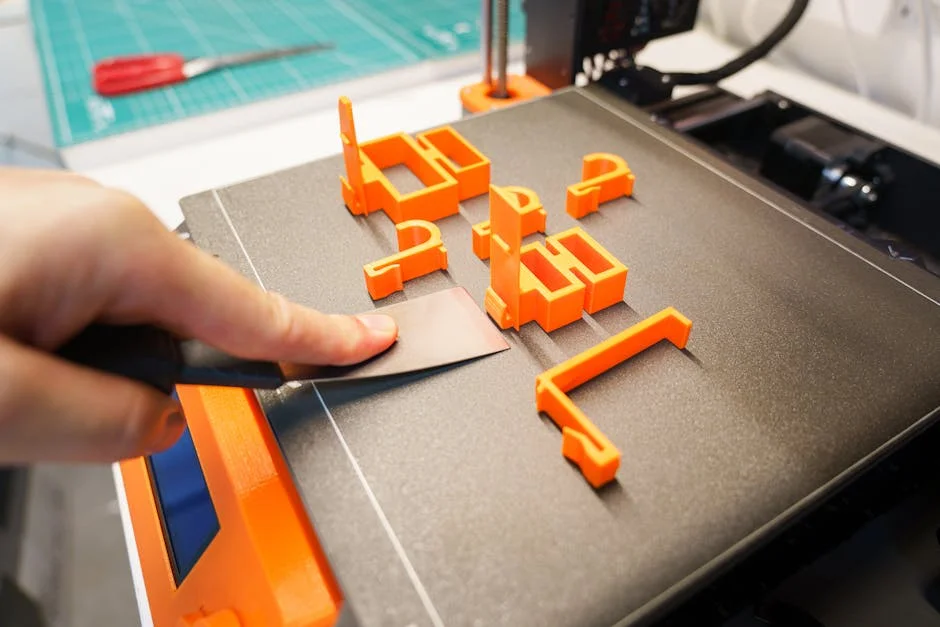
Building a diy 3d printer is less about proving that you can assemble parts and more about gaining control over how a machine behaves, how it is maintained, and how it evolves. Store-bought printers are convenient, but they often hide decisions behind proprietary firmware, locked-down profiles, or a parts ecosystem that makes small upgrades feel like major projects. With a self-built setup, every design choice is visible: the frame geometry, the motion system, the electronics stack, and the hotend path. That transparency becomes practical very quickly. When a print fails, you have an immediate mental map of where to look—belt tension, pulley alignment, thermistor seating, stepper current, or airflow across the part. That reduces downtime and removes the “mystery box” feeling that can slow down learning and troubleshooting.
Table of Contents
- My Personal Experience
- Why a DIY 3D Printer Still Matters in a World of Ready-Made Machines
- Choosing a Motion System: Cartesian, CoreXY, or Delta for a DIY Build
- Frame and Mechanics: Rigidity, Squareness, and Vibration Control
- Electronics and Control Boards: 8-Bit vs 32-Bit, Drivers, and Expandability
- Hotend, Extruder, and Filament Path: Direct Drive vs Bowden and Material Goals
- Build Plate and Bed Leveling: Surface Choices, Flatness, and Probing Strategies
- Firmware and Software Stack: Marlin, Klipper, and Calibration Workflows
- Expert Insight
- Safety, Power, and Wiring: Heat Management and Fire-Prevention Practices
- Budgeting and Sourcing Parts: Kits, Self-Sourced Builds, and Hidden Costs
- Common Build Mistakes and How to Avoid Weeks of Frustration
- Upgrades and Tuning: From “It Prints” to Consistent, High-Quality Output
- Realistic Expectations: Time, Learning Curve, and What Success Looks Like
- Final Thoughts: Making a DIY 3D Printer a Long-Term Tool, Not a One-Time Project
- Watch the demonstration video
- Frequently Asked Questions
- Trusted External Sources
My Personal Experience
I built my first DIY 3D printer last winter after getting tired of paying for small parts I knew I could make myself. I started with a cheap kit and quickly realized “assembly” meant hours of squaring the frame, redoing the wiring, and watching way too many calibration videos. The first prints were a mess—stringy blobs and warped corners—until I slowed the speed down, tightened the belts, and finally leveled the bed properly instead of guessing. Once it clicked, it felt incredibly satisfying to design a simple bracket in CAD, slice it, and hold a usable part an hour later. It’s still a bit temperamental, but I’ve learned more from troubleshooting that printer than from any project I’ve done in a long time.
Why a DIY 3D Printer Still Matters in a World of Ready-Made Machines
Building a diy 3d printer is less about proving that you can assemble parts and more about gaining control over how a machine behaves, how it is maintained, and how it evolves. Store-bought printers are convenient, but they often hide decisions behind proprietary firmware, locked-down profiles, or a parts ecosystem that makes small upgrades feel like major projects. With a self-built setup, every design choice is visible: the frame geometry, the motion system, the electronics stack, and the hotend path. That transparency becomes practical very quickly. When a print fails, you have an immediate mental map of where to look—belt tension, pulley alignment, thermistor seating, stepper current, or airflow across the part. That reduces downtime and removes the “mystery box” feeling that can slow down learning and troubleshooting.
A self-built printer also scales with your goals. Some people want a compact machine for PLA prototypes; others want a larger build volume for cosplay parts, functional jigs, or small-batch products. A kit can be a compromise, but a custom build can be planned around your use case from day one: higher temperature materials, a quieter motion system, faster travel speeds, or a rigid enclosure for ABS and nylon. The customization is not just cosmetic. A different motion architecture can change ringing, layer consistency, and maintainability. An all-metal hotend can expand material options. A better part cooling duct can make bridges and overhangs dependable. Over time, the printer becomes a platform. That’s why a diy approach remains relevant even when inexpensive prebuilt printers exist: it turns a consumer appliance into an adaptable tool that you understand deeply and can improve deliberately. If you’re looking for diy 3d printer, this is your best choice.
Choosing a Motion System: Cartesian, CoreXY, or Delta for a DIY Build
The motion system is the core mechanical decision behind any diy 3d printer, and it influences speed, accuracy, footprint, and complexity. Cartesian designs move the bed in one axis and the toolhead in the other axes, often resulting in simple geometry and straightforward troubleshooting. They’re popular because they can be built with minimal specialized parts and are forgiving during initial tuning. The downside is that a moving bed can introduce inertia, especially on larger machines, which can limit acceleration and create artifacts like ghosting. For modest build volumes and general PLA/PETG printing, a Cartesian layout is still an excellent, approachable choice because it’s easy to square the frame, easy to route wiring, and easy to service.
CoreXY systems move the toolhead in X and Y using a belt arrangement that keeps motors stationary, reducing moving mass and enabling higher acceleration. For a builder who wants speed without sacrificing print quality, CoreXY can be compelling. However, belt routing demands careful alignment and consistent tension; small mistakes can translate into skewed prints or inconsistent steps. Deltas are elegant and fast, using three towers and arms to position the effector, but calibration can be more complex, and the usable build volume is shaped differently than the physical footprint. When selecting among these, consider your priorities: if you want predictable assembly and easier first success, Cartesian is friendly; if you want performance and are comfortable with precise belt geometry, CoreXY is powerful; if you value smooth high-speed motion and enjoy calibration challenges, delta can be rewarding. Matching the architecture to your patience, tools, and goals is often the difference between a printer that becomes reliable and one that stays perpetually “almost finished.” If you’re looking for diy 3d printer, this is your best choice.
Frame and Mechanics: Rigidity, Squareness, and Vibration Control
Mechanical rigidity is the foundation of consistent prints, and it becomes even more important when building a diy 3d printer from scratch. A frame that flexes will show up as ringing, layer misalignment, or inconsistent dimensions. Aluminum extrusion frames are common because they balance stiffness, modularity, and affordability. They also make it easier to add panels, cable chains, camera mounts, and enclosures later. Steel frames can be extremely rigid but may require drilling, tapping, or welding, which raises the tool requirements. Acrylic and wood can work for small, low-speed machines, but they tend to move with temperature and time, and they can transmit vibration in unpredictable ways. The goal is not simply “strong,” but “stiff in the directions that matter,” particularly across the X/Y plane and around the Z axis where wobble can manifest as repeating patterns on the surface.
Squareness and alignment are as important as raw rigidity. Even a stiff frame can produce skewed prints if the axes are not perpendicular. During assembly, measuring diagonals, using a machinist square, and tightening fasteners in a deliberate sequence can prevent weeks of calibration frustration. Vibration control is another often underestimated factor. Stepper motors generate pulses that can resonate with the frame, especially at certain speeds. Adding structural braces, using quality idlers and pulleys, ensuring belts run parallel, and mounting the printer on a heavy surface can reduce these effects. Some builders add rubber feet or dense pads, but excessive isolation can sometimes amplify wobble if the base becomes “springy.” A balanced approach—rigid frame, stable table, clean belt paths, and sensible accelerations—creates a machine that can print faster while staying quiet and dimensionally consistent. If you’re looking for diy 3d printer, this is your best choice.
Electronics and Control Boards: 8-Bit vs 32-Bit, Drivers, and Expandability
Electronics determine how smoothly a diy 3d printer moves, how safely it heats, and how easily it can be upgraded later. Modern 32-bit control boards have largely replaced older 8-bit designs for good reasons: more processing headroom, higher step rates, better support for advanced motion planning, and easier integration with features like input shaping, pressure advance, and network connectivity. That said, an 8-bit board can still produce good prints at moderate speeds, especially for smaller Cartesian builds, but it may become a bottleneck as you push acceleration or add features. A sensible approach is to pick a 32-bit board with a strong community, clear documentation, and enough stepper driver channels for your planned configuration, including dual Z motors or additional extruders if those are in your future.
Stepper drivers deserve careful attention because they affect noise, temperature, and print artifacts. Modern silent drivers can reduce the high-pitched stepper whine and improve microstepping smoothness, but they must be configured correctly for current limits and cooling. Overcurrent can overheat motors and drivers; undercurrent can cause missed steps that look like random layer shifts. Expandability matters too: extra fan headers, additional thermistor inputs, support for a filament runout sensor, and ports for a probe can simplify future improvements. Consider wiring practicality as well. Screw terminals are easy to service, while crimped connectors can be more reliable if done properly. Adding ferrules, using the correct wire gauge for heaters, and planning cable strain relief are not optional details; they are the difference between a stable printer and one that intermittently fails due to vibration and heat cycling. When the electronics are chosen with headroom, the printer remains a platform rather than a dead end. If you’re looking for diy 3d printer, this is your best choice.
Hotend, Extruder, and Filament Path: Direct Drive vs Bowden and Material Goals
The extrusion system defines what materials your diy 3d printer can handle and how consistently it can lay down plastic. A direct drive extruder places the drive gears close to the hotend, improving retraction control and making flexible filaments like TPU far easier. It can also improve responsiveness during pressure changes, which helps with sharp corners and small features. The tradeoff is added moving mass on the toolhead, which can increase ringing unless the motion system and accelerations are tuned carefully. Bowden setups keep the motor off the toolhead, reducing weight and enabling higher acceleration, but they can struggle with flexible filaments and may require more retraction, which can lead to stringing or inconsistent extrusion if the filament path has friction.
Hotend choice should be driven by temperature requirements and reliability. An all-metal hotend expands options into higher-temperature materials, but it can be less forgiving with heat creep if cooling is poor. A PTFE-lined hotend is often easier for PLA at moderate temperatures but is limited in safe operating range. Nozzle selection matters as well: brass is common and prints cleanly, hardened steel is better for abrasive filaments like carbon-fiber blends, and larger nozzle diameters can dramatically reduce print time for big parts. The filament path should be smooth and constrained, with quality tubing and minimal sharp turns. Even small details—like a well-aligned extruder gear, a properly seated heatbreak, and a fan that directs air where it’s needed—can prevent clogs and under-extrusion. When the extrusion system is chosen around your materials and tuned carefully, the printer becomes predictable, which is the real goal whether you print decorative models or functional components. If you’re looking for diy 3d printer, this is your best choice.
Build Plate and Bed Leveling: Surface Choices, Flatness, and Probing Strategies
The build surface is where success or failure becomes visible first, and it’s a critical area in any diy 3d printer. A flat, stable bed reduces the need for constant adjustment and improves first-layer consistency across the entire build area. Common options include glass, spring steel with PEI, textured powder-coated sheets, and specialized adhesive surfaces. Each has a personality: glass can be very flat and produce a glossy bottom finish, but it may need adhesives for some materials; PEI is popular for its grip and easy release when cooled; textured plates can hide first-layer lines and improve adhesion for certain plastics. Heated beds add complexity but greatly expand material compatibility and reduce warping for many filaments.
Bed leveling has evolved from manual screws to assisted methods using probes and firmware compensation. Manual leveling is valuable even if you use probing because it keeps the bed within a reasonable range and reduces the amount of compensation required. A probe can map minor variations and correct them in software, but it cannot fix a bed that is severely tilted or mechanically unstable. Choosing a probing method depends on your bed surface and design: inductive probes work well with metal surfaces, BLTouch-style probes are versatile, and strain gauge or nozzle-contact systems can be very accurate but require careful setup. Whatever method you choose, consistency matters more than sophistication. Solid bed mounts, stable springs or silicone spacers, and a repeatable homing sequence will keep the first layer dependable. Good first layers reduce failed prints, wasted filament, and the temptation to chase settings endlessly when the real problem is mechanical instability at the foundation. If you’re looking for diy 3d printer, this is your best choice.
Firmware and Software Stack: Marlin, Klipper, and Calibration Workflows
Firmware is where a diy 3d printer becomes a coherent machine rather than a collection of parts. Marlin remains a widely used choice because it supports many boards, has extensive features, and has a long history in the hobby. It can deliver excellent results when configured properly, especially for builders who prefer an all-in-one solution on the printer’s controller. Klipper, by contrast, offloads computation to a host such as a Raspberry Pi or similar device, enabling advanced features and easier iteration through configuration files. For builders who enjoy tuning and want to push speed with tools like input shaping, Klipper can be transformative. The best choice depends on your comfort with Linux, networking, and the idea of maintaining a small computer alongside the printer.
Expert Insight
Start your DIY 3D printer build by locking down the frame: use a machinist square to align every corner, tighten fasteners in a cross pattern, and re-check squareness after each major step. A rigid, true frame prevents layer shifts and makes calibration faster than chasing issues later with firmware tweaks.
Before your first real print, run a simple calibration routine: set belt tension so it “twangs” lightly, verify steps/mm with a 20 mm cube, and tune first-layer height using a single-layer test. Keep notes on each adjustment so you can revert quickly and build a repeatable setup. If you’re looking for diy 3d printer, this is your best choice.
Calibration is not a single step; it’s a sequence that builds confidence. Start with mechanical checks—belt tension, pulley set screws, smooth axis travel—then verify steps per millimeter, motor direction, and endstop behavior. Thermal calibration matters too: confirm thermistor readings, run PID tuning for the hotend and bed, and validate that cooling fans respond correctly. Extrusion calibration, including e-steps (or rotational distance in some systems), flow tuning, and retraction testing, helps prevent over- or under-extrusion. Software profiles in your slicer should match your hardware reality: nozzle diameter, filament type, temperature range, and acceleration limits. A disciplined workflow—change one variable at a time, record results, and keep known-good profiles—prevents the common trap of random setting changes that make problems harder to diagnose. With a stable firmware configuration and a repeatable calibration routine, the printer stops being temperamental and starts being a reliable manufacturing tool. If you’re looking for diy 3d printer, this is your best choice.
Safety, Power, and Wiring: Heat Management and Fire-Prevention Practices
Safety is not an optional add-on when assembling a diy 3d printer; it’s a design requirement. The machine combines high temperatures, continuous electrical load, and moving parts, often running unattended for hours. Start with the power supply: choose a reputable unit with adequate wattage headroom, proper grounding, and a protective enclosure. AC wiring should be treated with respect—use the correct gauge wire, strain relief, and insulated connectors, and avoid exposed terminals. If you are not comfortable with mains wiring, consider prewired power entry modules and switch assemblies designed for enclosures. Fusing and proper grounding reduce risk, and a well-placed emergency stop can be invaluable.
| Option | Best for | Pros | Cons | Typical cost |
|---|---|---|---|---|
| Build from a kit | First-time DIY builders who want guidance | All parts included; proven design; faster assembly; easier troubleshooting | Less customization; quality varies by kit; still requires tuning | $200–$800 |
| Build from scratch (sourcing parts) | Hobbyists who want full control and upgrades | Maximum customization; choose higher-quality components; easier future mods | Time-consuming; compatibility risks; more calibration and iteration | $250–$1,200+ |
| Convert/upgrade an existing printer | Improving performance without a full rebuild | Lower effort than scratch; targeted gains (hotend, extruder, rails, firmware); reuse frame | Limited by base chassis; can introduce new issues; may not be cost-effective long-term | $50–$500 |
Heat management is equally important. Ensure the hotend heater cartridge is secured, the thermistor is firmly mounted, and wiring is protected from rubbing and repeated bending. Use cable chains or braided sleeves where appropriate, but avoid tight bends near the toolhead where wires flex constantly. Heated bed wiring should be robust, and any connectors should be rated for the current. Firmware protections like thermal runaway detection must be enabled and tested. Good airflow around electronics prevents driver overheating, and tidy wiring reduces the chance of shorts. Consider placing the printer on a non-flammable surface and keeping the area around it clear of clutter. A smoke alarm in the workspace is a practical layer of protection. The goal is not to be fearful; it’s to be deliberate. A carefully wired, well-ventilated machine with modern firmware safeguards can run reliably for long prints without turning your workspace into a hazard. If you’re looking for diy 3d printer, this is your best choice.
Budgeting and Sourcing Parts: Kits, Self-Sourced Builds, and Hidden Costs
Cost planning for a diy 3d printer can be deceptively tricky because the headline price of major components rarely includes the small items that make assembly smooth and reliable. A kit simplifies sourcing by bundling compatible parts, pre-cut frame pieces, and fasteners, which reduces the risk of ordering mismatched hardware. Kits can also save time, and many come with community-tested build guides. Self-sourcing, however, provides maximum control over quality and configuration. You can choose premium rails, higher-end hotends, quieter fans, or a specific control board without paying for parts you plan to replace anyway. The tradeoff is that you become the integrator, responsible for ensuring that belt widths, pulley tooth counts, stepper shaft lengths, and mounting patterns all match.
Hidden costs often include tools and consumables: a decent hex key set, crimpers for ferrules and JST connectors, calipers, threadlocker, spare nozzles, heat-resistant wiring, and assorted fasteners. Shipping costs can add up when parts come from multiple vendors, and the time cost of waiting for replacements is real if something arrives incorrect. It’s wise to budget for spares that can stop a project from stalling—extra belts, a spare thermistor, additional PTFE tubing, and a backup nozzle. Also consider the “future cost” of your initial decisions. A cheap hotend that clogs frequently costs time and wasted filament. A flimsy frame can limit speed and reduce print quality, prompting upgrades that ultimately exceed the price of doing it right once. A clear budget anchored to your printing goals—materials, volume, speed, and noise—helps you spend where it matters and save where it doesn’t. If you’re looking for diy 3d printer, this is your best choice.
Common Build Mistakes and How to Avoid Weeks of Frustration
Many problems blamed on slicer settings are actually mechanical issues introduced during assembly of a diy 3d printer. One of the most common mistakes is insufficient attention to alignment: belts not running parallel, pulleys not aligned with idlers, or a gantry that isn’t square. These issues can cause inconsistent layer lines, dimensional inaccuracies, and random-seeming artifacts. Another frequent problem is loose fasteners in places that experience vibration, such as motor mounts and pulley set screws. A pulley that slips even slightly can create layer shifts that look like a firmware glitch. Using threadlocker where appropriate, tightening in a sensible pattern, and rechecking after the first few hours of motion can prevent these headaches.
Wiring mistakes are another category that can waste days. Reversed motor connectors, poorly crimped terminals, and cables rubbing against moving parts can create intermittent faults that are hard to reproduce. Labeling wires, using proper strain relief, and routing cables with the full range of motion in mind are simple habits with huge payoff. Cooling is often overlooked as well: a hotend heatsink fan that’s underpowered or incorrectly aimed can cause heat creep and clogs, while insufficient part cooling can ruin overhangs and bridges. Finally, many builders rush calibration and change too many variables at once. When a print fails, it’s tempting to adjust temperature, retraction, speed, flow, and cooling all together, which hides the real cause. A calmer approach—verify mechanics, then thermals, then extrusion, then slicer—turns troubleshooting into a process rather than guesswork. The result is a machine that becomes more reliable with time instead of one that constantly demands attention. If you’re looking for diy 3d printer, this is your best choice.
Upgrades and Tuning: From “It Prints” to Consistent, High-Quality Output
Once a diy 3d printer produces decent prints, the next phase is refinement. Upgrades should be driven by observed limitations, not trends. If you see ringing on corners, consider reducing moving mass, improving belt paths, stiffening the frame, or tuning acceleration and input shaping. If you struggle with first layers, focus on bed flatness, probe repeatability, and a stable mounting method rather than endlessly changing adhesives. If extrusion is inconsistent, look at filament path friction, extruder gear alignment, hotend temperature stability, and the quality of the nozzle. A small improvement in consistency often does more for print quality than a dramatic upgrade that introduces new variables.
Noise and usability upgrades can also make the machine more enjoyable to run daily. Quieter fans, better electronics cooling, and vibration-damping measures can reduce the “always-on” harshness that some printers produce. Lighting, a camera mount, and a clean enclosure can improve workflow, especially if the printer is used for long jobs. Advanced tuning can include pressure advance to reduce corner blobbing, linear rails for smoother motion, or a better part cooling system for clean overhangs. Keep a baseline profile that you know works, then test changes methodically with repeatable models: temperature towers, retraction tests, and dimensional calibration prints. The goal is not perfection in a single weekend; it’s predictable performance. When a printer is predictable, you can choose settings based on the part’s needs—strength, surface finish, speed—rather than constantly compensating for unknown behavior. If you’re looking for diy 3d printer, this is your best choice.
Realistic Expectations: Time, Learning Curve, and What Success Looks Like
Success with a diy 3d printer looks different depending on your purpose. For some, success is printing functional brackets and jigs reliably. For others, it is pushing speed while keeping surfaces clean, or building a machine that can handle high-temperature engineering plastics. The time investment is real. Assembly can take anywhere from a weekend to several weeks depending on complexity, part availability, and how much customization is involved. Calibration and tuning are ongoing, especially as you change materials or add upgrades. This isn’t a negative; it’s the trade for control and understanding. If you enjoy learning how systems interact—mechanics, thermals, electronics, and software—the process is rewarding rather than tedious.
It also helps to set expectations around iteration. Early prints may be rough, and that’s normal. A first successful cube is not the finish line; it’s proof that the system basically works. From there, reliability comes from tightening the details: cable management, stable bed mounting, consistent cooling, and well-structured profiles. Keeping notes on changes, saving firmware configurations, and documenting known-good slicer settings prevents you from repeating the same experiments. Over time, the printer becomes less of a project and more of a tool you trust. The most satisfying outcome is not merely owning a machine, but having a printer that you can diagnose quickly, repair confidently, and adapt to new challenges. When you reach the point where a design idea can become a physical part without drama, you’ve achieved what most people actually want from a diy build: dependable capability on your own terms. If you’re looking for diy 3d printer, this is your best choice.
Final Thoughts: Making a DIY 3D Printer a Long-Term Tool, Not a One-Time Project
A printer that lasts is one that is designed for maintenance. That means choosing common fasteners, leaving room for access to key screws, avoiding wire routes that require disassembly to service, and using components with a strong supply chain. It also means treating configuration as part of the build: keep backups of firmware settings, label connectors, and document the final wiring layout. When something wears out—as belts, nozzles, and fans eventually do—you want replacement to be a routine task, not a teardown. A thoughtful enclosure, proper filtration if you print materials that produce odors or particles, and a clean workspace can make the printer safer and more pleasant to operate for years. If you’re looking for diy 3d printer, this is your best choice.
The deeper value of a diy 3d printer is that it teaches you how manufacturing systems behave under real constraints: heat, motion, friction, tolerances, and software control. That knowledge pays off whether you’re making prototypes, running a small side business, or simply enjoying the craft. The machine becomes a reflection of your priorities—quiet operation, fast iteration, high-detail models, or rugged functional parts—and it can evolve as those priorities change. By building with a clear goal, selecting parts that align with that goal, and tuning methodically, you end up with a printer that is not just capable but dependable. When the final result is a tool you can rely on, the time spent building and learning stops feeling like effort and starts feeling like ownership in the best sense: you know exactly what your diy 3d printer can do, and you know how to make it do more.
Watch the demonstration video
In this video, you’ll learn how to build a DIY 3D printer from the ground up, including choosing key components, assembling the frame and motion system, wiring electronics, and setting up firmware. It also covers calibration basics—like bed leveling and extrusion tuning—so you can start producing reliable prints quickly.
Summary
In summary, “diy 3d printer” is a crucial topic that deserves thoughtful consideration. We hope this article has provided you with a comprehensive understanding to help you make better decisions.
Frequently Asked Questions
What’s the easiest DIY 3D printer to build as a beginner?
If you’re building a **diy 3d printer** for the first time, a Prusa i3-style kit or a straightforward Cartesian design is usually the easiest place to start, thanks to the huge number of tutorials, readily available parts, and strong community support to help you along the way.
How much does it cost to build a DIY 3D printer?
Most **diy 3d printer** builds typically cost anywhere from $200 to $800, depending on the printer’s size, frame design, motion system, and electronics—though opting for premium components can quickly drive the total even higher.
What tools do I need to assemble a DIY 3D printer?
For a **diy 3d printer** build, you’ll want a solid set of basic tools on hand: hex keys and screwdrivers for assembly, flush cutters for trimming, calipers and a square for accurate measurements and alignment, plus zip ties for clean cable management. If you’re doing any custom wiring, a soldering iron and crimping tools are also handy optional additions.
Which parts are most important for print quality in a DIY build?
The biggest improvements come from getting the fundamentals right: build a rigid frame, choose quality motion parts like rails and belts, use a dependable hotend and extruder, ensure stable bed leveling, and take the time to tune your firmware—especially if you’re building a **diy 3d printer**.
What firmware should I use for a DIY 3D printer?
Marlin is the go-to firmware for many makers, while Klipper is a favorite if you want higher performance by pairing your **diy 3d printer** with a host computer. Whichever you choose, the key is dialing in the configuration so it matches your exact hardware setup.
What are the most common problems when building a DIY 3D printer?
Common problems with a **diy 3d printer** often come down to loose belts, axes that aren’t properly aligned, messy wiring or poor grounding, incorrect stepper motor settings, not enough cooling, and the usual bed-leveling or first-layer headaches.
📢 Looking for more info about diy 3d printer? Follow Our Site for updates and tips!

Trusted External Sources
- How dumb it is to build a 3d printer from scratch? : r/arduino – Reddit
Apr 12, 2026 … Without experience 3d printing and a printer to print parts youll need to make … DIY printers make heavy use of printed parts. The best … If you’re looking for diy 3d printer, this is your best choice.
- Cheapest and Best 3D Printer Kits, DIY 3D Printer and Reprap Kits
Buy 3D printer kit and DIY 3D printer online at 3D Printers Bay. Check available discounts and order best 3d printer kit now. Call +1(218)257-0035 for any …
- Looking for DIY open source mini 3D printer recommendations
On July 29, 2026, I started looking for an open-source mini 3D printer with a maximum build area of around 15×15. This is purely a just-for-fun project—ideally a **diy 3d printer** I can tinker with and learn from along the way.
- Best DIY 3D Printers – Kingroon
Aug 1, 2026 — Unleash your creativity with a **diy 3d printer** you can build at home. Follow our clear, step-by-step guide packed with practical tips to help you assemble an affordable 3D printer and start bringing your ideas to life.
- Any tutorial to DIY a 3d printer? : r/3dprinter – Reddit
May 12, 2026 … Is your goal to try and make a 3D printer as cheaply as possible? When I got into 3D printing, building your own by sourcing a Perusa i3 or a … If you’re looking for diy 3d printer, this is your best choice.