
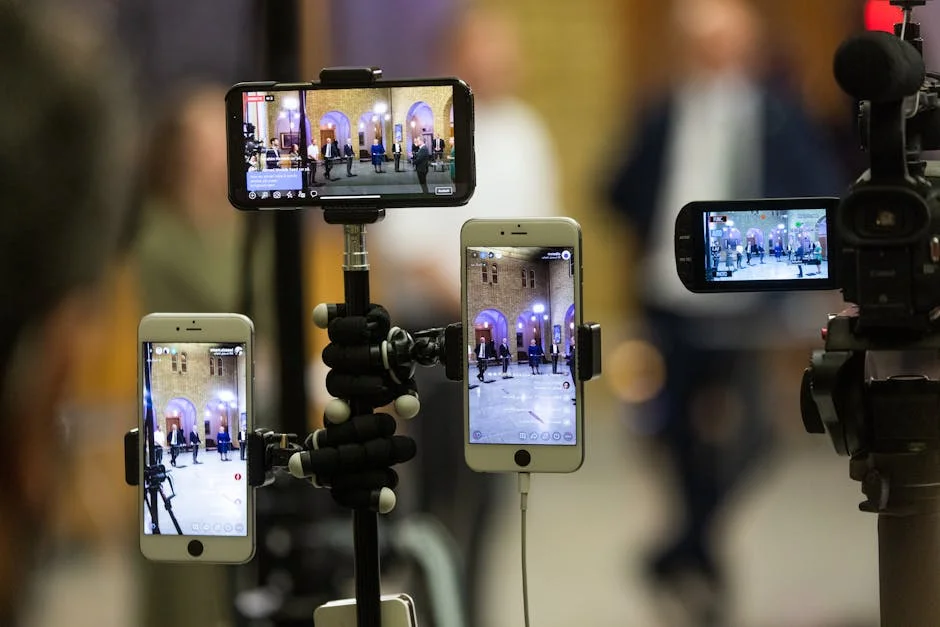
Finding a good camera for live streaming starts with understanding what “good” means for your specific broadcasts, not what looks impressive on a spec sheet. Live content is unforgiving: autofocus hunts, exposure shifts, and audio sync issues become instantly noticeable because viewers watch in real time and can’t be distracted by editing. A strong live streaming camera is one that produces a stable, clean image under your typical lighting, holds focus on your face or product reliably, and integrates smoothly with your computer or capture workflow without random disconnects. Many creators overbuy resolution while underinvesting in lighting and audio, yet a balanced setup consistently wins. The “good” choice often comes down to predictability—repeatable color, minimal overheating, and low-latency output that stays on for hours. If your streams last 30 minutes, your needs differ from a four-hour gaming session or an all-day conference feed. A camera that is “good” for a handheld vlogger might be frustrating as a fixed studio camera if it has aggressive auto exposure or limited clean HDMI options.
Table of Contents
- My Personal Experience
- Choosing a Good Camera for Live Streaming: What “Good” Really Means
- Key Specs That Matter Most for Live Streaming Quality
- Webcams vs Mirrorless vs DSLR vs Camcorders: Picking the Right Category
- Best Use Cases: Gaming, Talking Head, Podcasts, Classes, and Events
- Lighting and Color: How a Camera Performs in Real Rooms
- Autofocus, Exposure, and Stability: The “Invisible” Features Viewers Notice
- Connectivity: USB Streaming, Clean HDMI, Capture Cards, and Latency
- Expert Insight
- Audio Integration Considerations When Selecting a Camera
- Single-Camera vs Multi-Camera Live Streaming Setups
- Budget Tiers and What to Expect at Each Price Point
- Setup Tips to Get the Best Results from Your Live Streaming Camera
- Common Mistakes That Prevent a Camera from Being “Good” for Live Streaming
- How to Decide Today: A Practical Checklist for the Right Choice
- Watch the demonstration video
- Frequently Asked Questions
- Trusted External Sources
My Personal Experience
After a few frustrating streams using my laptop’s grainy webcam, I finally upgraded to a Sony ZV‑E10 and it made an immediate difference. The picture looked sharper, my skin tones stopped looking washed out, and it handled my dim room way better once the sun went down. Setup was simpler than I expected—USB connection, a dummy battery so it wouldn’t die mid-stream, and a basic 16mm lens to keep the framing wide without cranking the ISO. The biggest surprise was how much more “professional” everything felt even before I changed anything else, and my chat started commenting on the quality the first night I used it. It wasn’t the cheapest option, but for live streaming it’s the first camera I’ve owned that actually feels like a long-term upgrade instead of a temporary fix. If you’re looking for good camera for live streaming, this is your best choice.
Choosing a Good Camera for Live Streaming: What “Good” Really Means
Finding a good camera for live streaming starts with understanding what “good” means for your specific broadcasts, not what looks impressive on a spec sheet. Live content is unforgiving: autofocus hunts, exposure shifts, and audio sync issues become instantly noticeable because viewers watch in real time and can’t be distracted by editing. A strong live streaming camera is one that produces a stable, clean image under your typical lighting, holds focus on your face or product reliably, and integrates smoothly with your computer or capture workflow without random disconnects. Many creators overbuy resolution while underinvesting in lighting and audio, yet a balanced setup consistently wins. The “good” choice often comes down to predictability—repeatable color, minimal overheating, and low-latency output that stays on for hours. If your streams last 30 minutes, your needs differ from a four-hour gaming session or an all-day conference feed. A camera that is “good” for a handheld vlogger might be frustrating as a fixed studio camera if it has aggressive auto exposure or limited clean HDMI options.
A practical definition of a good camera for live streaming includes a few non-negotiables: clean HDMI or reliable USB/UVC output, the ability to disable auto power-off, stable continuous autofocus (or excellent manual focus tools), and a sensor/lens combination that looks flattering at typical streaming distances. Many streamers sit close to a camera; that changes lens choices, background compression, and how noise appears on skin tones. Another hidden factor is heat: some cameras that record internally at high bitrates may overheat, but live output often generates less heat—still, you want confidence that your camera won’t shut down mid-stream. Also consider how the camera behaves when connected to a computer: does it show up instantly, does it require proprietary software, and does it preserve your chosen settings after a reboot? Finally, “good” includes ergonomics—easy access to exposure, white balance, and focus settings—because live troubleshooting needs speed. If you build your decision around these real streaming behaviors rather than marketing terms, you’ll end up with a camera that serves your content instead of constantly demanding attention.
Key Specs That Matter Most for Live Streaming Quality
When evaluating a good camera for live streaming, a few specifications affect real-world results far more than others. Resolution is the most misunderstood: 1080p is still the dominant viewing format on many platforms, and a clean, sharp 1080p feed with good lighting often looks better than a noisy 4K feed. That said, 4K can be useful for cropping and reframing in OBS or similar software, especially if you want a “virtual multi-camera” look from a single angle. Frame rate matters too, but not always the way people assume. For talking-head streams, 30 fps is typically fine; for fast motion, gameplay with a face cam, or product demos with hand movement, 60 fps can look smoother if your platform and encoder settings support it. More important than max frame rate is consistent frame pacing and low-latency output so your lips match your audio without constant delay adjustments.
Sensor size and lens quality influence low-light performance and background blur, but they can also create challenges. Large sensors (APS-C, full-frame) can deliver a more cinematic look, yet the shallow depth of field can be unforgiving if you lean forward and your eyes drift out of focus. For live work, many creators prefer a slightly deeper depth of field, achieved by stopping down the aperture (higher f-number) and adding light. Dynamic range is another real factor: if you stream with bright windows or strong highlights, a camera that handles highlights gracefully will prevent your face from turning into a silhouette. Look for reliable continuous autofocus, face/eye detection, and minimal “focus breathing” if you care about a polished look. Also, pay attention to output options: clean HDMI is a classic route with a capture card, while USB UVC is convenient but may limit bitrate or control. Finally, consider color science and white balance stability. A camera that shifts color temperature as you move can make your stream feel unprofessional even if it’s technically sharp. If you’re looking for good camera for live streaming, this is your best choice.
Webcams vs Mirrorless vs DSLR vs Camcorders: Picking the Right Category
A good camera for live streaming can come from several categories, and each has strengths that align with different streaming styles. Webcams are the simplest: plug-and-play, powered over USB, minimal heat issues, and usually recognized instantly by streaming software. Higher-end webcams can look surprisingly good in decent lighting, especially those that offer manual exposure controls and decent dynamic range. The main limitations are sensor size and lens flexibility, which can lead to softer images in low light and less control over background blur. Still, for creators who want reliability and speed, a premium webcam is often the most hassle-free option. If you stream primarily from a desk and want a consistent look without extra hardware, a webcam may be the “good” choice even compared to more expensive cameras.
Mirrorless cameras are popular because they can deliver a crisp, professional image with interchangeable lenses and strong autofocus. Many modern mirrorless bodies include clean HDMI and sometimes direct USB streaming, making them versatile. The trade-offs include cost, the need for a capture card in many setups, potential overheating on certain models, and the need for continuous power solutions. DSLRs can also work, but older models often have limited live-view autofocus and may not provide clean HDMI without overlays. Camcorders are underappreciated for streaming: they’re designed for long runtimes, stable continuous autofocus, and powered operation, which makes them excellent for events, teaching, and church streaming. Their smaller sensors may not produce the same cinematic depth of field, but they often deliver consistent exposure and fewer interruptions. The best category depends on whether you prioritize simplicity, image aesthetics, or long-duration stability. If you’re looking for good camera for live streaming, this is your best choice.
Best Use Cases: Gaming, Talking Head, Podcasts, Classes, and Events
Matching a good camera for live streaming to your content format is more important than chasing the highest specs. For gaming, the face cam is usually a smaller on-screen element, so clarity, accurate skin tones, and stable autofocus matter more than extreme background blur. A solid 1080p camera with good low-light performance can be ideal because many gaming rooms rely on LED lighting that can flicker or create mixed color temperatures. If you use RGB lights, a camera with strong white balance control and good handling of saturated colors will keep your face from looking overly red or green. Frame rate can be beneficial if you move a lot on camera, but it’s not required for most face-cam overlays. The key is consistency and ease of use, because gaming streams often involve switching scenes, chatting, and managing overlays at the same time.
For talking-head streams, podcasts, coaching, and online classes, your camera is the main visual focus. That’s where lens choice and depth of field become meaningful. A camera that produces a flattering perspective—often achieved with a slightly longer focal length and enough distance from the camera—can make your stream feel more professional. For classes and tutorials, you may need overhead shots or a second angle for hands-on demonstrations, which can push you toward cameras with clean HDMI and capture card setups. For events like conferences, panels, or worship services, reliability and zoom range matter: a camcorder with optical zoom and continuous operation can be a better live streaming camera than a hybrid photo camera. In these scenarios, you also benefit from clean, stable output and the ability to run for hours without worrying about battery life, heat, or sudden shutdowns. If you’re looking for good camera for live streaming, this is your best choice.
Lighting and Color: How a Camera Performs in Real Rooms
A good camera for live streaming is only as good as the light you feed it, and many “camera problems” are actually lighting problems. Low light forces higher ISO, which introduces noise, reduces detail, and can make skin look blotchy. Even an expensive camera will struggle if the room is dim and lit by a single overhead bulb. For live streaming, you want soft, directional light that flatters faces and keeps the camera at a lower ISO. A simple key light placed slightly above eye level, angled down, can dramatically improve clarity and reduce harsh shadows. If your background is important, a small fill light or practical lamps can separate you from the background without making the scene look flat. Cameras also react differently to mixed light sources. Daylight from a window plus warm indoor lighting can cause inconsistent white balance, creating a distracting color shift during the stream.
Color accuracy matters because viewers associate stable color with quality, even if they can’t explain why. A camera that drifts in auto white balance can make your skin tone fluctuate, and that can be more noticeable than a slight lack of sharpness. Many streamers get better results by setting a fixed white balance based on their key light and leaving it there. If your camera supports picture profiles, choose something that looks good straight out of the camera rather than a flat profile intended for heavy color grading. Live content benefits from a pleasing, finished look without extra correction. Also consider flicker: certain LED lights flicker at frequencies that cause banding in the image, especially with mismatched shutter speed settings. A camera with good manual controls helps you set shutter speed and frame rate combinations that minimize flicker. When you treat lighting and color as part of the camera choice, you’ll find it easier to identify a good camera for live streaming that delivers consistent results day after day.
Autofocus, Exposure, and Stability: The “Invisible” Features Viewers Notice
Many people define a good camera for live streaming by sharpness, but viewers often react more strongly to focus and exposure behavior. If your camera constantly refocuses on the microphone, a hand gesture, or the background, the stream feels unstable and amateurish. Reliable face/eye autofocus is valuable, but it must be predictable. Some cameras offer tracking modes that work well until you turn your head or bring an object close to the lens. If your content includes product demos, you might want a camera that can switch quickly between face focus and object focus without hunting. In some cases, manual focus is the best solution, especially if your camera is fixed on a tripod and your position doesn’t change much. A camera with focus peaking or magnification tools makes manual focus far easier to set accurately.
Exposure behavior is just as important. Auto exposure that “pumps” brighter and darker when you move slightly can be distracting, especially with bright monitors in the frame. A good live streaming camera should allow you to lock exposure, lock ISO, and set shutter speed and aperture manually. If you must use auto exposure, look for cameras with exposure compensation controls so you can prevent the image from blowing out. Stability also includes how the camera handles long sessions without glitches. Some cameras have time limits for recording, but live output can still be stable—however, you must confirm that the camera won’t dim, sleep, or show warning icons after a set period. Overheating and random shutdowns are catastrophic for live content, so creators often prioritize models known for continuous operation. These “invisible” features—focus confidence, exposure consistency, and runtime stability—often separate a merely decent option from a truly good camera for live streaming.
Connectivity: USB Streaming, Clean HDMI, Capture Cards, and Latency
A good camera for live streaming must connect to your streaming device in a way that matches your workflow and platform. USB streaming is convenient: many webcams and some mirrorless cameras can appear as a standard webcam source in OBS, Streamlabs, Zoom, Teams, or browser-based tools. The advantage is simplicity and fewer cables. The downside is that USB implementations vary widely. Some cameras cap resolution or frame rate over USB, compress the image heavily, or introduce noticeable latency. Proprietary webcam utilities can also be finicky across operating system updates. If you want maximum compatibility and consistent quality, clean HDMI output into a capture card is often the most dependable route. A capture card converts the HDMI feed into a webcam-like input with stable performance and typically better quality at the same resolution.
Expert Insight
Prioritize clean HDMI output and reliable autofocus when choosing a good camera for live streaming. Look for a model that can run continuously without overheating, supports USB-C power or a dummy battery, and offers 1080p60 (or 4K if you plan to crop) for a sharper, more flexible feed.
Match the camera to your setup by confirming compatibility with your capture method before buying. If you’re using a capture card, verify the camera outputs a “clean” signal (no icons) at the resolution and frame rate you need; if you’re going USB, confirm it supports UVC/webcam mode and test audio routing so your mic stays in sync. If you’re looking for good camera for live streaming, this is your best choice.
Latency is an important but overlooked factor. If your camera feed arrives late compared to your microphone audio, your stream will show lip-sync issues. Some capture cards and camera combinations add delay; some platforms add their own processing. A good live streaming camera setup is one where you can measure and correct sync in your software, or better yet, avoid large delays in the first place. Also consider cable length and signal stability. HDMI can be sensitive to long runs, so for event streaming you may need active cables or SDI-based systems, though SDI is more common in professional broadcast gear. Power is part of connectivity too. Many cameras require a dummy battery or AC adapter for long streams; webcams draw power directly from USB. If you want a “set it and forget it” workflow, prioritize stable power delivery and a connection method that doesn’t randomly drop. The most impressive image is useless if the camera disconnects mid-session, so connectivity is central to choosing a good camera for live streaming.
Audio Integration Considerations When Selecting a Camera
Although the focus is often on video, a good camera for live streaming should fit into a clean audio plan. Many creators use a USB microphone or an XLR interface, which means the camera’s built-in mic is irrelevant. Still, camera choice can affect audio indirectly through sync, monitoring, and workflow. Some cameras add processing delay to the video feed, forcing you to offset audio in software. Others output a low-latency feed that stays closer to real-time. If you plan to route audio through the camera—common in event setups where audio comes from a mixer into the camera’s input—then you need a camera with a microphone jack, manual audio levels, and ideally a headphone jack for monitoring. Without monitoring, you can stream for an hour with distorted or dead audio and not realize it until it’s too late.
| Camera Type | Best For Live Streaming | Key Pros | Key Cons |
|---|---|---|---|
| Webcam (1080p/4K) | Plug-and-play streams, meetings, beginner setups | Easy USB setup, reliable autofocus, great value | Smaller sensor, limited low-light performance, fewer lens options |
| Mirrorless Camera (clean HDMI) | Creators wanting top image quality and background blur | Excellent low-light, interchangeable lenses, high-end look | Needs capture card, potential overheating, higher cost |
| Camcorder | Long sessions (events, sermons, classes) and continuous recording | No record limits, strong zoom, dependable continuous operation | Less cinematic depth of field, weaker low-light vs mirrorless, larger setup |
Audio also influences camera placement. If your mic is on a boom arm, you might bring it close to your mouth and keep it out of frame, which can affect how wide your lens needs to be and how far the camera sits. For desk setups, a slightly tighter shot can look more professional, but it requires the microphone to be positioned carefully so it doesn’t block your face or trigger autofocus problems. Some cameras are more prone to focusing on the mic because of contrast and proximity. If you do rely on camera audio for certain scenarios—like a mobile live stream or a quick setup—then wind noise handling, preamp quality, and input options matter. Even if you never plug audio into the camera, choosing a model that plays nicely with your audio workflow, keeps sync manageable, and doesn’t force awkward placement can be part of what makes it a good camera for live streaming.
Single-Camera vs Multi-Camera Live Streaming Setups
A good camera for live streaming in a single-camera setup should provide enough flexibility to keep your content visually engaging. If you only have one angle, features like 4K output (for cropping into multiple “virtual” shots), reliable autofocus, and a lens that frames you well become more important. Many creators use OBS to create scenes that simulate multiple camera angles by cropping, zooming, or switching between full frame and tight shots. This approach can look polished if the source image is sharp and well-lit, and if the camera remains stable. A single-camera workflow also benefits from simplicity: fewer capture devices, fewer points of failure, and easier troubleshooting. For creators who stream frequently, reducing complexity often increases consistency, which viewers notice and appreciate.
Multi-camera setups introduce new requirements. If you want two or three cameras—face cam, overhead, side angle—you need consistent color matching and exposure behavior across devices. Mixing different camera brands or categories can lead to noticeable color differences, forcing you to correct with LUTs or filters. You also need enough capture inputs and USB bandwidth, plus a plan for switching scenes smoothly. In multi-camera systems, a “good” choice may be a camera that isn’t the most cinematic but matches well with your other angles and runs reliably. For example, two identical cameras can be easier to match than one high-end mirrorless and one basic webcam. Consider also the lenses: an overhead camera may need a wider field of view and strong sharpness across the frame, while a face camera may benefit from a more flattering focal length. Thinking in terms of a system rather than a single purchase helps you choose a good camera for live streaming that scales as your production grows.
Budget Tiers and What to Expect at Each Price Point
Budget strongly shapes what qualifies as a good camera for live streaming, but value is not purely about price. At entry-level budgets, a quality webcam paired with good lighting can outperform a cheap interchangeable-lens camera used in poor light. In this tier, prioritize reliability, decent low-light performance for a webcam, and manual controls if available. Many creators get a clean, professional look by using a 1080p webcam, setting a fixed white balance, and adding a key light. The biggest improvements often come from lighting and framing rather than from jumping to a more expensive camera. If your platform compresses heavily, the difference between a mid-level camera and a great webcam may be smaller than expected, especially on mobile viewers.
In the mid-range, mirrorless cameras and higher-end camcorders become realistic, along with capture cards and better lenses. This is where you can achieve a more cinematic look, cleaner low-light performance, and better background separation, but you also take on more complexity. You may need a dummy battery, a capture device, and careful heat management. In the higher-end tier, you can build a very robust setup with multiple cameras, consistent color, and strong dynamic range, but the returns diminish if your lighting, audio, and streaming bitrate are not equally strong. A good live streaming camera at a higher budget is often one that saves you time: it holds settings, avoids overheating, and integrates smoothly with your switching and encoding workflow. Instead of chasing the most expensive body, allocate funds to lenses, lighting, mounting, and a reliable capture pipeline, because those pieces often determine whether your stream looks professional every time you go live. If you’re looking for good camera for live streaming, this is your best choice.
Setup Tips to Get the Best Results from Your Live Streaming Camera
Even a good camera for live streaming can look mediocre if it’s set up poorly. Start with placement: put the camera at or slightly above eye level for a flattering angle, and keep it close enough that you don’t need an extreme wide lens that distorts your face. Frame with intention—leave a bit of headroom, avoid cutting off shoulders awkwardly, and ensure your background supports your content rather than distracting from it. Next, lock down the basics: set your resolution and frame rate to match your streaming platform and encoder, then set shutter speed appropriately (often double the frame rate, such as 1/60 for 30 fps) to keep motion natural. Choose a fixed white balance based on your key light, and avoid auto settings that drift. If your camera allows it, reduce sharpening and noise reduction slightly to prevent a crunchy, overprocessed look after platform compression.
Focus and exposure deserve special attention. If your camera’s autofocus is strong, use face/eye detection and adjust sensitivity so it doesn’t jump to the background. If autofocus is unreliable, switch to manual focus and mark your position so you stay in the focus plane. For exposure, avoid letting the camera chase brightness changes from monitors; consider lowering monitor brightness or changing the angle so the screen isn’t reflecting into your face. Keep ISO as low as practical by improving lighting. Also, ensure continuous power: use an AC adapter or dummy battery for cameras that need it, and disable sleep timers and auto power-off features. Cable management matters more than people expect; a loose HDMI connection can end a stream instantly. Finally, test for at least 30–60 minutes before important broadcasts to confirm heat stability and sync. These steps turn a capable device into a truly good camera for live streaming by making its performance consistent and predictable.
Common Mistakes That Prevent a Camera from Being “Good” for Live Streaming
One of the most common mistakes when buying a good camera for live streaming is prioritizing resolution over reliability and control. A camera that can output 4K doesn’t help if it overheats, shows overlays, or disconnects randomly. Another frequent issue is relying on automatic settings. Auto white balance can shift constantly, auto exposure can pump, and autofocus can hunt at the worst times. Viewers interpret these behaviors as low quality, even if the camera is expensive. Many creators also underestimate the importance of lens choice and distance. Sitting too close to a wide lens can exaggerate facial features and make the background look chaotic. A modest change—moving the camera back and zooming in slightly—can produce a more flattering perspective and a cleaner composition.
Workflow mistakes can be just as damaging. Using long USB chains, unpowered hubs, or cheap capture devices can introduce instability that looks like a camera problem. Another mistake is ignoring heat and power requirements; running on a battery can lead to sudden shutdowns, and some cameras dim or sleep unless configured properly. Audio-video sync is also mishandled frequently: creators upgrade cameras and then wonder why their voice is ahead of their lips. Measuring delay and applying a consistent offset in streaming software often fixes it, but it requires awareness. Finally, many people skip lighting and then blame the camera for noise, softness, or dull colors. If you correct these common pitfalls—manual control, stable power, dependable capture, and proper lighting—you make it far easier for any good camera for live streaming to deliver the polished look you’re aiming for.
How to Decide Today: A Practical Checklist for the Right Choice
To choose a good camera for live streaming without getting lost in endless comparisons, decide based on constraints and usage. First, list your primary platform and typical stream length. If you stream on Zoom or Teams for work, compatibility and low friction matter more than cinematic depth of field. If you stream on Twitch or YouTube for hours, continuous runtime and heat stability become critical. Next, define your environment: do you have controlled lighting, or do you stream in a room with changing daylight? If lighting is inconsistent, prioritize a camera with strong dynamic range and stable manual controls. Then consider framing: do you need a wide shot for standing presentations, an overhead view for crafts, or a tight head-and-shoulders shot? Your lens needs and autofocus needs change depending on whether you move around or stay seated.
From there, choose the simplest connection method that meets your quality goals. If you want minimal setup, a high-quality webcam or a camera with robust USB UVC support can be the best live streaming camera option. If you want maximum quality and flexibility, clean HDMI into a reputable capture card is often more consistent. Confirm essentials before purchasing: clean output without overlays, the ability to disable auto sleep, continuous power support, and stable performance for the duration of your streams. If possible, look for real-world reports of long streaming sessions, not just short reviews. Finally, plan for the whole system: a camera plus light, mount, and audio often beats an expensive body alone. The right decision is the one that supports your schedule and reduces troubleshooting. When your setup is reliable, your content improves—and that’s the real definition of a good camera for live streaming.
Watch the demonstration video
In this video, you’ll learn how to choose a good camera for live streaming based on image quality, low-light performance, autofocus, and ease of setup. It breaks down key features like clean HDMI, frame rates, and lens options, and compares popular camera types so you can pick the best fit for your platform, budget, and streaming style.
Summary
In summary, “good camera for live streaming” is a crucial topic that deserves thoughtful consideration. We hope this article has provided you with a comprehensive understanding to help you make better decisions.
Frequently Asked Questions
What makes a camera good for live streaming?
When choosing a **good camera for live streaming**, look for clean HDMI or dependable USB output, crisp 1080p or 4K video, strong low-light performance, smooth continuous autofocus, and a design that won’t cut out due to recording limits or overheating.
Is a webcam or a mirrorless/DSLR better for streaming?
Webcams are usually the simplest and most budget-friendly option to get started, while mirrorless and DSLR cameras can deliver a more polished look with better low-light performance and that pleasing background blur. The trade-off is that using a dedicated camera as a **good camera for live streaming** often means extra gear—like a capture card—and a bit more setup time.
Do I need a capture card for a streaming camera?
If your camera only outputs video through HDMI and your computer doesn’t have an HDMI input, you’ll need a capture card to connect it for streaming. However, if you’re using a **good camera for live streaming** that supports USB webcam (UVC) mode, you can often plug it in via USB and skip the capture card entirely.
What resolution and frame rate should I stream at?
For most platforms, 1080p at 60fps looks crisp and smooth, while 1080p at 30fps is usually more than enough for simple talking-head streams. Stepping up to 4K can make sense if you want extra room to crop your shot or you’re aiming to future-proof—just make sure your internet upload speed can handle it and that you’ve got a **good camera for live streaming**.
How do I prevent overheating and power issues during long streams?
For worry-free sessions, power your setup with a dummy battery or USB-C power delivery, turn off any nonessential features, lower the screen brightness, and make sure the camera has plenty of airflow to stay cool. Most importantly, pick a model with a strong track record for long, uninterrupted recording—so you’re using a **good camera for live streaming** that can handle extended broadcasts without overheating or shutting down.
What lenses and accessories improve live-stream quality most?
A fast prime lens (around 24–35mm equivalent) or a crisp zoom, paired with a solid key light, a quality microphone, a sturdy tripod or arm, and dependable cables can transform your setup—because in many cases, great lighting and clean audio matter even more than having a **good camera for live streaming**.
? Looking for more info about good camera for live streaming? Follow Our Site for updates and tips!

Trusted External Sources
- Best camera for streaming ? : r/Twitch – Reddit
Feb 20, 2026 … I’m using the Logitech StreamCam for my primary camera. You can get by with a Logitech C920 and decent lighting. Lighting is the most important … If you’re looking for good camera for live streaming, this is your best choice.
- What camera is best for church livestreaming with a 90ft distance …
Jul 20, 2026 … Canon CR series seem to be great. We have 2 CR300s and they has served us well. It all depends on your budget, but PTZ is most likely the best … If you’re looking for good camera for live streaming, this is your best choice.
- Best camera for streaming? : r/Twitch – Reddit
If budget isn’t an issue, I’d recommend the Logitech StreamCam—it’s a **good camera for live streaming** thanks to its built-in stabilization and the flexibility to switch between landscape and portrait mode whenever you need.
- What is a good budget camera for live streaming church services?
Jul 7, 2026 … If you’ve got a limited budget and want a camcorder instead of a DSLR, the Canon Vixia HF R series is about the best you can do on an ultra … If you’re looking for good camera for live streaming, this is your best choice.
- Best camera for live-streaming? : r/DJs – Reddit
Nov 21, 2026 … I use a Canon M6 II with either a 22mm 2.0f lens (35 mm equivalent for a full frame) or a 32mm 1.8f lens. Both look great although I do use some … If you’re looking for good camera for live streaming, this is your best choice.

